Blog

  • deps-walker

    deps-walker

    Graph traversal to walk through ESM dependency graph for further static analysis. The traversal algorithm is classified as Breadth-first search (BFS).

    Install

    $ npm install deps-walker

    Usage

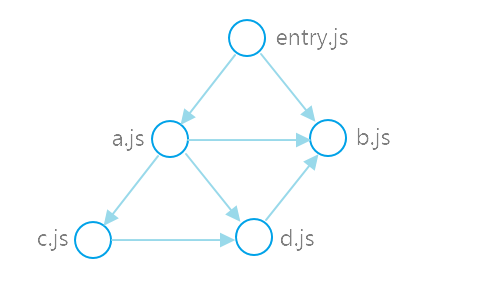
    Here is an example of an entry point module entry.js with its dependencies, which in turn depend on their dependencies, which in turn depend on…

    //------ entry.js ------
    import a from './a.js';
    import b from './b.js';
    
    //------ a.js ------
    import b from './b.js';
    import c from './c.js';
    import d from './d.js';
    
    //------ c.js ------
    import d from './d.js';
    
    //------ d.js ------
    import b from './b.js';

    In other words:

    entry.js -> a.js
    entry.js -> b.js
    a.js -> b.js
    a.js -> c.js
    a.js -> d.js
    c.js -> d.js
    d.js -> b.js
    

    dependency graph

    deps-walker is used to traverse entry.js dependency graph:

    const walk = require('deps-walker')();
    
    walk('entry.js', (err, data) => {
      if (err) {
        // catch any errors...
        return;
      }
      const { filePath, dependencies } = data;
      // analyse module dependencies
    });

    The dependencies are traversed in the following order:

    Breadth-first search traverse

    Async/await API

    deps-walker support async/await API, it can be used to await traverse completion:

    async function traverse() {
      await walk('entry.js', (err, data) => {
        /*...*/
      });
      console.log('Traverse is completed');
    }

    Multiple entry points

    deps-walker supports multiple roots:

    walk(['entry1.js', 'entry2.js', 'entry3.js'], (err, data) => {
      /*...*/
    });

    Parsers

    deps-walker uses @babel/parser with sourceType: 'module' option by default. You can specify any other available options:

    const babelParse = require('deps-walker/lib/parsers/babel');
    const walk = require('deps-walker')({
      parse: (...args) =>
          babelParse(...args, {
          // options
          sourceType: 'module',
          plugins: ['jsx', 'flow']
        })
    });

    or specify your own parse implementation:

    const walk = require('deps-walker')({
      parse: (code, filePath) => {
        // parse implementation
      }
    });

    Resolvers

    It is not always obvious where import x from 'module' should look to find the file behind module, it depends on module resolution algorithms, which are specific for module bundlers, module syntax specs, etc.. deps-walker uses resolve package, which implements NodeJS module resolution behavior. You may configure NodeJS resolve via available options:

    const nodejsResolve = require('deps-walker/lib/resolvers/nodejs');
    const walk = require('deps-walker')({
      resolve: (...args) =>
        nodejsResolve(...args, {
          // options
          extensions: ['.js'],
          paths: ['rootDir'],
          moduleDirectory: 'node_modules'
        })
    });

    You can also use other module resolution algorithms:

    const walk = require('deps-walker')({
      resolve: async (filePath, contextPath) => {
        // resolve implementation
      }
    });

    Ignoring

    You may break traversal for some dependencies by specifying ignore function:

    const walk = require('deps-walker')({
      // ignore node_modules
      ignore: filePath => /node_modules/.test(filePath)
    });

    Caching

    Module parsing and resolving can be resource intensive operation (CPU, I/O), cache allows you to speed up consecutive runs:

    const cache = require('deps-walker/cache');
    const walk = require('deps-walker')({ cache });
    //...
    await cache.load('./cache.json');
    await walk('entry.js', (err, data) => {
      /*...*/
    });
    await cache.save('./cache.json');

    Reading

    You can also override the default file reader:

    const fsPromises = require('fs').promises;
    const read = _.memoize(filePath => fsPromises.readFile(filePath, 'utf8'));
    const walk = require('deps-walker')({ read });

    License

    MIT

    Visit original content creator repository
  • dotfiles

    Martin Mena’s Dotfiles and dev environment

    CI Status

    Welcome to my personal dotfiles repository, tailored for the 🐟 Fish shell. These configurations are designed to create a baseline for my development environment, integrating seamlessly with VSCode, Starship, tmux, etc.

    Shell demo

    Key Features

    • Prompt Customization with ⭐️🚀 Starship: A sleek, informative command-line interface built in Rust.

    • Effortless Dotfile Management: Uses chezmoi for a streamlined process to update, install, and configure my environment with a simple one-line command.

    • Intelligent OS Detection: Automatically installs OS-specific packages, ensuring compatibility and ease of setup.

    • User-Guided Installation Script: Tailored setup with interactive prompts to select only the tools I need.

    • Enhanced File Listing with eza: A more colorful and user-friendly ls command.

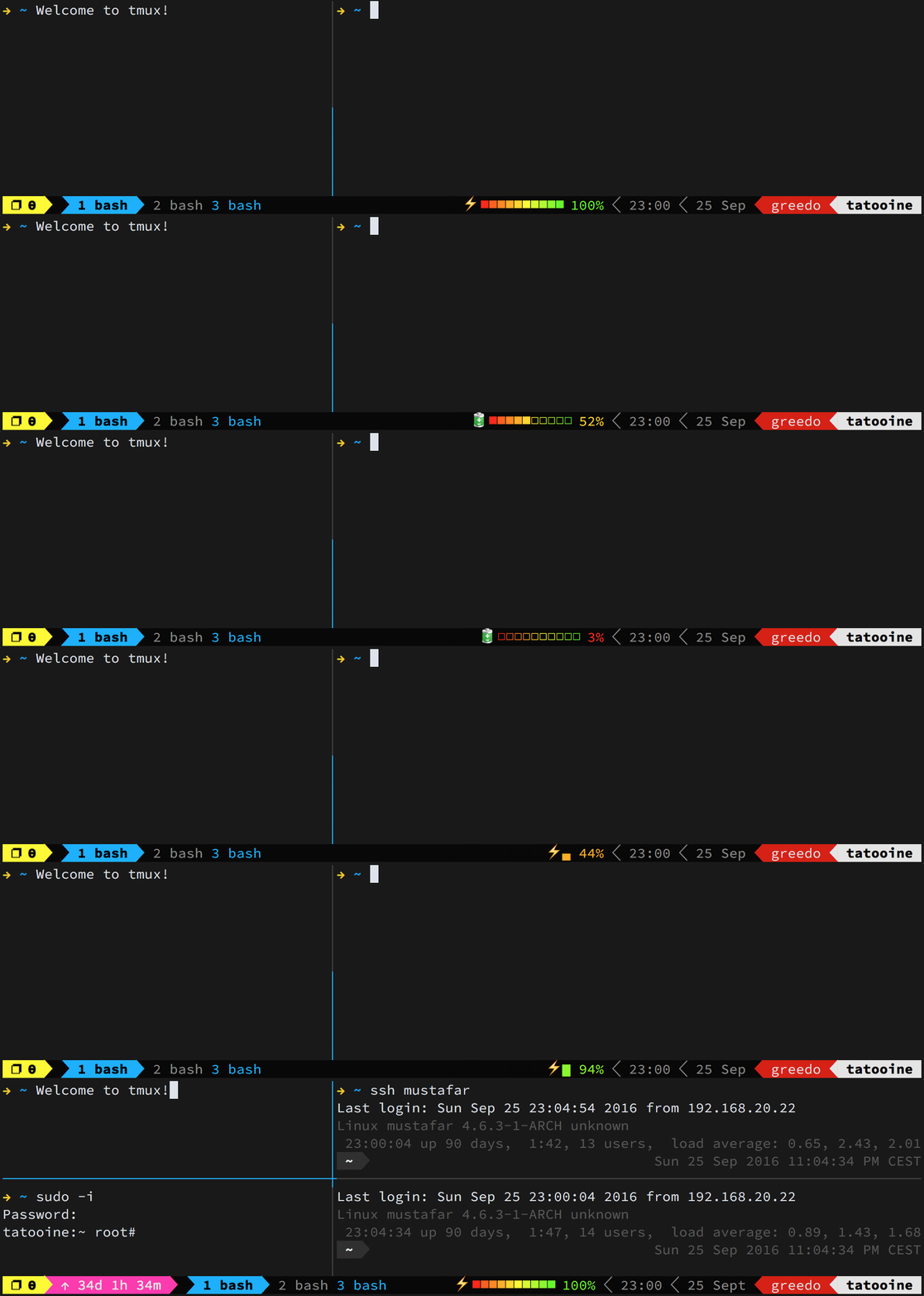
    • Optimized Tmux Configuration: Benefit from a powerful Tmux setup by gpakosz, enhancing your terminal multiplexer experience.

      Tmux configuration demo

    Getting Started

    Compatibility

    Note: This setup is currently optimized for macOS and Debian-based Linux distributions.

    Installation

    To install, choose one of the following methods and execute the command in my terminal:

    • Curl:

      sh -c "$(curl -fsLS get.chezmoi.io)" -- init --apply mmena1
    • Wget:

      sh -c "$(wget -qO- get.chezmoi.io)" -- init --apply mmena1
    • Homebrew:

      brew install chezmoi
      chezmoi init --apply mmena1
    • Snap:

      snap install chezmoi --classic
      chezmoi init --apply mmena1

    Updating my Setup

    Keep my environment fresh and up-to-date with a simple command:

    chezmoi update

    This will fetch and apply the latest changes from the repository, ensuring my setup remains optimal.

    Under the Hood

    Custom Fish Scripts

    Leveraging the best of oh-my-zsh, I’ve crafted custom Fish scripts, including git and eza abbreviations, enriching my shell without the need for plugins.

    Chezmoi: The Backbone

    At the heart of my dotfile management is Chezmoi, a robust tool offering templating features to dynamically adapt scripts across various systems, alongside the capability to preview and verify scripts before execution.

    Modular Task Management

    A task-based approach is used for managing the setup and configuration of my development environment. Instead of running a monolithic script, the setup process is broken down into discrete tasks that can be individually registered, managed, and executed.

    Key features of the task management system:

    • Task Registration: Each setup component is registered as a task with a name, description, list of dependencies, and execution function.
    • Dependency Resolution: Tasks specify their dependencies, ensuring they’re executed in the correct order. For example, package installation requires Homebrew to be installed first (only for macOS).
    • Interactive Execution: Before each task runs, I’m prompted to confirm, letting me customize my setup process.
    • Error Handling: If a task fails, I can choose to continue with the remaining tasks or abort the setup.
    • Modular Implementation: Setup components are organized into modules (package management, shell configuration, development tools, etc.) that can be maintained independently.

    This approach makes the setup process more maintainable, flexible, and user-friendly. New tasks can be added without modifying existing code, and dependencies are automatically resolved to ensure a smooth setup experience.

    sequenceDiagram
        participant User
        participant SetupScript
        participant TaskManager
        participant TaskModule
    
        User->>SetupScript: Initiate environment setup
        SetupScript->>TaskManager: Register setup tasks
        TaskManager->>TaskManager: Check dependencies for each task
        TaskManager->>TaskModule: Execute task module (e.g., packages, tools, shell)
        TaskModule-->>TaskManager: Return task status
        TaskManager-->>SetupScript: Report consolidated task results
        SetupScript->>User: Display "Setup completed" message
    
    Loading

    Acknowledgments

    A special thanks to:

    License

    This project is licensed under the ISC License – see Martin Mena for more details.

    Visit original content creator repository
  • screen-recorder

    Screen Recorder

    A library to capture and record from your audio and video devices.

    Contains the main library and two example applications (command line and graphic interface).

    A video presentation of the QT application can be found here.

    Build

    MacOS

    1. Install dependencies

    brew install ffmpeg
    brew install fmt
    brew install qt6
    
    1. Build project

    export CMAKE_PREFIX_PATH=/usr/local/Cellar/qt/6.2.2
    mkdir build
    cd build
    cmake -DCMAKE_BUILD_TYPE=Release ..
    cmake --build .  
    

    Linux

    1. Install dependencies

    sudo apt-get install libavdevice-dev
    sudo apt-get install libavfilter-dev
    sudo apt-get install libfmt-dev
    sudo apt-get install libxrandr-dev
    sudo apt-get install pip
    pip install -U pip
    pip install aqtinstall
    aqt install-qt linux desktop 6.2.0
    
    1. Build project

    sudo snap install cmake --classic
    export CMAKE_PREFIX_PATH=~/6.2.0/gcc_64
    mkdir build
    cd build
    cmake -DCMAKE_BUILD_TYPE=Release ..
    cmake --build .  
    

    Windows

    1. Install CMake (>= 3.22)

    2. Install Visual Studio environment for desktop c++ applications

    3. Install Qt6 MSVC environment for desktop applications

    4. Install dependencies

    cd \
    git clone https://github.com/Microsoft/vcpkg.git
    cd vcpkg
    .\bootstrap-vcpkg.bat
    .\vcpkg integrate install
    .\vcpkg install ffmpeg[avcodec,avdevice,avfilter,avformat,avresample,core,gpl,postproc,swresample,swscale,x264,ffmpeg]:x64-windows
    .\vcpkg install fmt:x64-windows
    
    1. Build project

    cmake -DCMAKE_TOOLCHAIN_FILE=C:/vcpkg/scripts/buildsystems/vcpkg.cmake -DCMAKE_BUILD_TYPE:STRING=Release -DCMAKE_PREFIX_PATH=C:/Qt/6.2.3/msvc2019_64 ..
    cmake --build  . -- /property:Configuration=Release
    
    1. Provide dependencies
    • Release:

    cd build\qt_screen_recorder\Release
    C:\Qt\6.2.3\msvc2019_64\bin\windeployqt.exe -qmldir ..\..\..\qt_screen_recorder\components --release appqt_screen_recorder.exe
    
    • Debug:

    cd build\qt_screen_recorder\Debug
    C:\Qt\6.2.3\msvc2019_64\bin\windeployqt.exe -qmldir ..\..\..\qt_screen_recorder\components --debug appqt_screen_recorder.exe
    
    1. Run

    set QSG_RHI_BACKEND=opengl // Might be needed for VMs
    appqt_screen_recorder.exe
    

    Visit original content creator repository

  • iforgor

    Iforgor

    Iforgor is a customisable and easy to use command line tool to manage code samples.
    It’s a good way to quickly get your hand on syntax you dont remember right from your terminal without wasting time looking on the internet.

    Installation

    Method :

    Creates symlinks of iforgor.py and the snippets folder to /usr/local/bin. So that it can be run from anywhere on the terminal.

    Requirements :

    • Python.
    • Git.
    • The colorama python module.

    Step by step procedure :

    1. Open a terminal and cd into the directory you want to install the program into.

    2. Run “git clone https://github.com/Solirs/iforgor/

    3. Cd into the newly created “iforgor” directory

    4. Run “./setup.sh” as root (it has to be run as root since it needs to create files in /usr/local/bin), add the ungit argument to remove github related files and folders like the readme and license.

    5. Run “iforgor -h”

    If it works, the install was successful.
    You can then delete setup.sh

    Uninstall:

    To uninstall, simply delete the ‘iforgor’ and ‘snippets’ symlinks in /usr/local/bin.

    Then delete the iforgor folder.

    Iforgor 101

    To display a piece of code, run the following.

    iforgor LANGUAGE SNIPPET

    The language argument represents a folder in the “snippets” directory.
    You can add any language you want by creating a folder in it.

    The snippet argument represents a *.txt file in the specified language directory that containd the code sample you want to display.
    You can add any code sample by creating a *.txt in a desired language folder.

    So if you want to add a function sample for the, lets say Rust language for example.
    You will have to create a directory named “rust” in the snippets folder.
    And create a function.txt file in the rust folder with the code you want inside.

    You can then print it out by running iforgor rust function

    Pro tips:

    • Languages and snippets are case insensitive. So you can run ‘iforgor lAnGuAgE sNiPpeT’.

    • You dont need to do the setup process, but its required if you want to be able to run iforgor easily from anywhere.

    • There are default snippets yes, but iforgor is designed to be customized, dont hesitate to add your own custom snippets and languages.

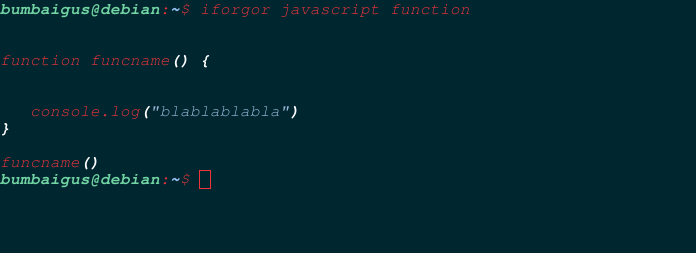
    Screenshots:

    alt text

    Compatibility

    Linux

    This should work on pretty much any linux distro, but i can make mistakes, so dont hesitate opening an issue if you face problems.

    Iforgor was tested on:

    Debian 11 : Working

    Void Linux : Working

    Arch Linux : Working

    BSDs and other unix based operating systems.

    Those are less certain to work, but you can still give it a try.

    Tested on:

    FreeBSD : Working

    OpenBSD : Working

    Want to contribute ?

    Sure. All help is accepted.

    The code is very commented if you want to take a look at it.

    PLEASE dont forget to star the project if you find it interesting, it helps out a ton.

    Visit original content creator repository

  • minisound

    minisound

    A high-level real-time audio playback, generation and recording library based on miniaudio. The library offers basic functionality and quite low latency. Supports MP3, WAV and FLAC formats.

    Platform support

    Platform Tested Supposed to work Unsupported
    Android SDK 31, 19 SDK 16+ SDK 15-
    iOS None Unknown Unknown
    Windows 11, 7 (x64) Vista+ XP-
    macOS None Unknown Unknown
    Linux Fedora 39-40, Mint 22 Any None
    Web Chrome 93+, Firefox 79+, Safari 16+ Browsers with an AudioWorklet support Browsers without an AudioWorklet support

    Migration

    There was some pretty major changes in 2.0.0 version, see the migration guide down below.

    Getting started on the web

    While the main script is quite large, there is a loader script provided. Include it in the web/index.html file like this

      <script src="assets/packages/minisound_web/build/minisound_web.loader.js"></script>

    It is highly recommended NOT to make the script defer, as loading may not work properly. Also, it is very small (only 18 lines).

    And at the bottom, at the body’s <script> do like this

                                    // ADD 'async'
    window.addEventListener('load', async function (ev) {
        {{flutter_js}}
        {{flutter_build_config}}
    
        // ADD THIS LINE TO LOAD THE LIBRARY 
        await _minisound.loader.load();
    
        // LEAVE THE REST IN PLACE
        // Download main.dart.js
        _flutter.loader.load({
            serviceWorker: {
                serviceWorkerVersion: {{flutter_service_worker_version}},
            },
            onEntrypointLoaded: function (engineInitializer) {
                engineInitializer.initializeEngine().then(function (appRunner) {
                    appRunner.runApp();
                });
            },
        });
        }
      );

    Minisound depends on SharedArrayBuffer feature, so you should enable cross-origin isolation on your site.

    Usage

    To use this plugin, add minisound as a dependency in your pubspec.yaml file.

    Playback

    // if you are using flutter, use
    import "package:minisound/engine_flutter.dart" as minisound;
    // and with plain dart use
    import "package:minisound/engine.dart" as minisound;
    // the difference is that flutter version allows you to load from assets, which is a concept specific to flutter
    
    void main() async {
      final engine = minisound.Engine();
    
      // engine initialization
      {
        // you can pass `periodMs` as an argument, to change determines the latency (does not affect web). can cause crackles if too low
        await engine.init(); 
    
        // for web: this should be executed after the first user interaction due to browsers' autoplay policy
        await engine.start(); 
      }
    
    
      // there is a base `Sound` interface that is implemented by `LoadedSound` (which reads data from a defined length memory location) 
      final LoadedSound sound;
    
      // sound loading
      {
        // there are also `loadSoundFile` and `loadSound` methods to load sounds from file (by filename) and `TypedData` respectfully
        final sound = await engine.loadSoundAsset("asset/path.ext");
    
        // you can get and set sound's volume (1 by default)
        sound.volume *= 0.5;
      }
    
    
      // playing, pausing and stopping
      {
        sound.play();
    
        await Future.delayed(sound.duration * .5); // waiting while the first half plays
    
        sound.pause(); 
        // when sound is paused, `resume` will continue the sound and `play` will start from the beginning
        sound.resume(); 
    
        sound.stop(); 
      }
    
      
      // looping
      {
        final loopDelay = const Duration(seconds: 1);
    
        sound.playLooped(delay: loopDelay); // sound will be looped with one second period
    
        // btw, sound duration does not account loop delay
        await Future.delayed((sound.duration + loopDelay) * 5); // waiting for sound to loop 5 times (with all the delays)
    
        sound.stop();
      }
    
      // engine and sounds will be automatically disposed when gets garbage-collected
    }

    Generation

    // you may want to read previous example first for more detailed explanation
    
    import "package:minisound/engine_flutter.dart" as minisound;
    
    void main() async {
      final engine = minisound.Engine();
      await engine.init(); 
      await engine.start(); 
    
      // `Sound` is also implemented by a `GeneratedSound` which is extended by `WaveformSound`, `NoiseSound` and `PulseSound` 
    
      // there are four types of a waveform: sine, square, triangle and sawtooth; the type can be changed later
      final WaveformSound wave = engine.genWaveform(WaveformType.sine);
      // and three types of a noise: white, pink and brownian; CANNOT be changed later
      final NoiseSound noise = engine.genNoise(NoiseType.white);
      // pulsewave is basically a square wave with a different ratio between high and low levels (which is represented by the `dutyCycle`)
      final PulseSound pulse = engine.genPulse(dutyCycle: 0.25);
    
      wave.play();
      noise.play();
      pulse.play();
      // generated sounds have no duration, which makes sense if you think about it; for this reason they cannot be looped
      await Future.delayed(const Duration(seconds: 1))
      wave.stop();
      noise.stop();
      pulse.stop();
    }

    Recording

    import "package:minisound/recorder.dart" as minisound;
    
    void main() async {
      // recorder records into memory using the wav format 
      final recorder = minisound.Recorder();
    
      // recording format characteristics can be changed via this function params
      recorder.init();
    
      // just starts the engine
      await recorder.start();
    
      await Future.delayed(const Duration(seconds: 1));
    
      // returns what've been recorded
      final recording = await recorder.stop();
    
      // all data is provided via buffer; sound can be used from it via `engine.loadSound(recording.buffer)`
      print(recording.buffer);
    
      // recordings will be automatically disposed when gets garbage-collected
    }

    Migration guide

    1.6.0 -> 2.0.0

    • Recording and generation APIs got heavily changed. See examples for new usage.

    • Sound autounloading logic got changed, now they depend on the sound object itself, rather than the engine.

      // remove
      // sound.unload();

    As a result, when Sound objects get garbage collected (which may be immediately after or not at the moment they go out of scope), they stop and unload. If you want to prevent this, you are probably doing something wrong, as this means you are creating an indefenetely played sound with no way to access it. Though this behaviour can still be disabled via the doAddToFinalizer parameter to sound loading and generation methods of the Engine class. However, it disables any finalization, so you’ll need to manage Sounds completely yourself. If you believe your usecase is valid, create a github issue and provide the code. Maybe it will change my mind.

    1.4.0 -> 1.6.0

    • The main file (minisound.dart) became engine_flutter.dart.

    // import "package:minisound/minisound.dart";
    // becomes two files
    import "package:minisound/engine_flutter.dart";
    import "package:minisound/engine.dart";

    Building the project

    A Makefile is provided with recipes to build the project and ease development. Type make help to see a list of available commands.

    To manually build the project, follow these steps:

    1. Initialize the submodules:

      git submodule update --init --recursive
    2. Run the following commands to build the project using emcmake:

      emcmake cmake -S ./minisound_ffi/src/ -B ./minisound_web/lib/build/cmake_stuff 
      cmake --build ./minisound_web/lib/build/cmake_stuff 

      If you encounter issues or want to start fresh, clean the build folder and rerun the cmake commands:

      rm -rf *
      emcmake cmake -S ./minisound_ffi/src/ -B ./minisound_web/lib/build/cmake_stuff 
      cmake --build ./minisound_web/lib/build/cmake_stuff 
    3. For development work, it’s useful to run ffigen from the minisound_ffi directory:

      cd ./minisound_ffi/
      dart run ffigen

    TODO

    Visit original content creator repository

  • HAPPI_GWAS_2

    HAPPI_GWAS_2

    The HAPPI_GWAS_2 is a pipeline built for genome-wide association study (GWAS).

    Requirements

    In order to run the HAPPI_GWAS_2, users need to install Miniconda and prepare the Miniconda environment in their
    computing systems.

    Miniconda can be downloaded from https://docs.anaconda.com/free/miniconda/.

    For example, if users plan to install Miniconda3 Linux 64-bit, the wget tool can be used to download the Miniconda.

    wget https://repo.anaconda.com/miniconda/Miniconda3-latest-Linux-x86_64.sh
    

    To install Miniconda in a server or cluster, users can use the command below.

    Please remember to replace the <installation_shell_script> with the actual Miniconda installation shell script. In our
    case, it is Miniconda3-latest-Linux-x86_64.sh.

    Please also remember to replace the <desired_new_directory> with an actual directory absolute path.

    chmod 777 -R <installation_shell_script>
    ./<installation_shell_script> -b -u -p <desired_new_directory>
    rm -rf <installation_shell_script>
    

    After installing Miniconda, initialization of Miniconda for bash shell can be done using the command below.

    Please also remember to replace the <desired_new_directory> with an actual directory absolute path.

    <desired_new_directory>/bin/conda init bash
    

    Installation of the Miniconda is required, and Miniconda environment needs to be activated every time before running the
    HAPPI_GWAS pipeline.

    Write a Conda configuration file (.condarc) before creating a Conda environment:

    nano ~/.condarc
    

    Put the following text into the Conda configuration file (make sure you change envs_dirs and pkgs_dirs) then save
    the file.

    Please make sure not use tab in this yaml file, use 4 spaces instead.

    Please make sure to replace /new/path/to/ with an actual directory absolute path.

    envs_dirs:
        - /new/path/to/miniconda/envs
    pkgs_dirs:
        - /new/path/to/miniconda/pkgs
    channels:
        - conda-forge
        - bioconda
        - defaults
    

    Create a Conda environment named happigwas by specifying all required packages (option 1):

    conda create -n happigwas conda-forge::openjdk=8.0.192 conda-forge::r-base \
    bioconda::vcftools bioconda::htslib conda-forge::pandas conda-forge::statsmodels \
    bioconda::snakemake bioconda::snakemake-executor-plugin-cluster-generic \
    conda-forge::r-devtools conda-forge::r-biocmanager conda-forge::r-argparse \
    conda-forge::r-dplyr conda-forge::r-tidyr conda-forge::r-tibble conda-forge::r-stringr \
    conda-forge::r-ggplot2 conda-forge::r-bh conda-forge::r-mvtnorm conda-forge::r-viridislite \
    conda-forge::r-stringi conda-forge::r-rcpp conda-forge::r-uuid conda-forge::r-nlme \
    conda-forge::r-digest conda-forge::r-matrix conda-forge::r-ape conda-forge::r-bigmemory \
    conda-forge::r-genetics conda-forge::r-gplots conda-forge::r-htmltools \
    conda-forge::r-lattice conda-forge::r-magrittr conda-forge::r-lme4 conda-forge::r-mass \
    bioconda::bioconductor-multtest conda-forge::r-plotly conda-forge::r-rcpparmadillo \
    conda-forge::r-rgl conda-forge::r-gridextra conda-forge::r-scatterplot3d \
    conda-forge::r-snowfall bioconda::bioconductor-snpstats conda-forge::r-biganalytics \
    conda-forge::r-biglm conda-forge::r-car conda-forge::r-foreach conda-forge::r-doparallel
    

    Create a Conda environment named happigwas by using a yaml environment file (option 2):

    conda create --name happigwas --file happigwas-environment.yaml
    

    Create a Conda environment named happigwas by using an explicit specification file (option 3):

    conda create --name happigwas --file happigwas-spec-file.txt
    

    Activate happigwas Conda environment:

    conda activate happigwas
    

    Start R in terminal:

    R
    

    Install required R packages (Do not update any packages if any messages with multiple choices pop-up):

    install.packages("EMMREML", repos = "https://cloud.r-project.org/")
    devtools::install_github('christophergandrud/DataCombine', force=TRUE)
    devtools::install_github("SFUStatgen/LDheatmap", force=TRUE)
    devtools::install_github("jiabowang/GAPIT", force=TRUE)
    

    Quit R:

    q()
    

    Installation

    You can install the HAPPI_GWAS_2 from Github with:

    git clone https://github.com/yenon118/HAPPI_GWAS_2.git
    

    Usage

    The HAPPI_GWAS_2 pipeline is a command line based pipeline that can be ran on any Linux computing systems. It consists
    of BLUP.py for best linear unbiased prediction, BLUE.py for best linear unbiased estimation, and HAPPI_GWAS.py for GWAS,
    haploblock analysis, and candidate gene identification. The command and arguments of each tool are shown as below:

    BLUP.py

    usage: python BLUP.py [-h] -p PROJECT_NAME -w WORKFLOW_PATH -i INPUT_FOLDER -o OUTPUT_FOLDER [-e FEATURE_COLUMN_INDEXES]
                            [--ulimit ULIMIT] [--memory MEMORY] [--threads THREADS]
                            [--keep_going] [--jobs JOBS] [--latency_wait LATENCY_WAIT] [--cluster CLUSTER]
    
    mandatory arguments:
      -p PROJECT_NAME, --project_name PROJECT_NAME
                            Project name
      -w WORKFLOW_PATH, --workflow_path WORKFLOW_PATH
                            Workflow path
      -i INPUT_FOLDER, --input_folder INPUT_FOLDER
                            Input folder
      -o OUTPUT_FOLDER, --output_folder OUTPUT_FOLDER
                            Output folder
    
    optional arguments:
      -h, --help            show this help message and exit
      -e FEATURE_COLUMN_INDEXES, --feature_column_indexes FEATURE_COLUMN_INDEXES
                            Feature column indexes
      --ulimit ULIMIT       Ulimit
      --memory MEMORY       Memory
      --threads THREADS     Threads
      --keep_going          Keep going
      --jobs JOBS           Jobs
      --latency_wait LATENCY_WAIT
                            Latency wait
      --cluster CLUSTER     Cluster parameters
    

    BLUE.py

    usage: python BLUE.py [-h] -p PROJECT_NAME -w WORKFLOW_PATH -i INPUT_FOLDER -o OUTPUT_FOLDER [-e FEATURE_COLUMN_INDEXES]
                            [--ulimit ULIMIT] [--memory MEMORY] [--threads THREADS]
                            [--keep_going] [--jobs JOBS] [--latency_wait LATENCY_WAIT] [--cluster CLUSTER]
    
    mandatory arguments:
      -p PROJECT_NAME, --project_name PROJECT_NAME
                            Project name
      -w WORKFLOW_PATH, --workflow_path WORKFLOW_PATH
                            Workflow path
      -i INPUT_FOLDER, --input_folder INPUT_FOLDER
                            Input folder
      -o OUTPUT_FOLDER, --output_folder OUTPUT_FOLDER
                            Output folder
    
    optional arguments:
      -h, --help            show this help message and exit
      -e FEATURE_COLUMN_INDEXES, --feature_column_indexes FEATURE_COLUMN_INDEXES
                            Feature column indexes
      --ulimit ULIMIT       Ulimit
      --memory MEMORY       Memory
      --threads THREADS     Threads
      --keep_going          Keep going
      --jobs JOBS           Jobs
      --latency_wait LATENCY_WAIT
                            Latency wait
      --cluster CLUSTER     Cluster parameters
    

    HAPPI_GWAS.py

    usage: python3 HAPPI_GWAS.py [-h] -p PROJECT_NAME -w WORKFLOW_PATH -i INPUT_FOLDER -o OUTPUT_FOLDER -v VCF_FILE -g GFF_FILE [--gff_category GFF_CATEGORY] [--gff_key GFF_KEY]
                                    [--genotype_hapmap GENOTYPE_HAPMAP] [--genotype_data GENOTYPE_DATA] [--genotype_map GENOTYPE_MAP]
                                    [--kinship KINSHIP] [--z_matrix Z_MATRIX] [--covariance_matrix COVARIANCE_MATRIX]
                                    [--snp_maf SNP_MAF] [--model MODEL] [--pca_total PCA_TOTAL]
                                    [--ulimit ULIMIT] [--memory MEMORY] [--threads THREADS]
                                    [--keep_going] [--jobs JOBS] [--latency_wait LATENCY_WAIT] [--cluster CLUSTER]
                                    [--p_value_filter P_VALUE_FILTER] [--fdr_corrected_p_value_filter FDR_CORRECTED_P_VALUE_FILTER] [--ld_length LD_LENGTH]
    
    mandatory arguments:
      -p PROJECT_NAME, --project_name PROJECT_NAME
                            Project name
      -w WORKFLOW_PATH, --workflow_path WORKFLOW_PATH
                            Workflow path
      -i INPUT_FOLDER, --input_folder INPUT_FOLDER
                            Input folder
      -o OUTPUT_FOLDER, --output_folder OUTPUT_FOLDER
                            Output folder
      -v VCF_FILE, --vcf_file VCF_FILE
                            VCF file
      -g GFF_FILE, --gff_file GFF_FILE
                            GFF file
    
    optional arguments:
      -h, --help            show this help message and exit
      --gff_category GFF_CATEGORY
                            GFF category
      --gff_key GFF_KEY     GFF key
      --genotype_hapmap GENOTYPE_HAPMAP
                            Genotype hapmap
      --genotype_data GENOTYPE_DATA
                            Genotype data
      --genotype_map GENOTYPE_MAP
                            Genotype map
      --kinship KINSHIP     Kinship matrix file
      --z_matrix Z_MATRIX   Z matrix file
      --covariance_matrix COVARIANCE_MATRIX
                            Covariance matrix file
      --snp_maf SNP_MAF     SNP minor allele frequency
      --model MODEL         Model
      --pca_total PCA_TOTAL
                            Total PCA
      --ulimit ULIMIT       Ulimit
      --memory MEMORY       Memory
      --threads THREADS     Threads
      --keep_going          Keep going
      --jobs JOBS           Jobs
      --latency_wait LATENCY_WAIT
                            Latency wait
      --cluster CLUSTER     Cluster parameters
      --p_value_filter P_VALUE_FILTER
                            P-value filter
      --fdr_corrected_p_value_filter FDR_CORRECTED_P_VALUE_FILTER
                            FDR corrected p-value filter
      --multipletests_method MULTIPLETESTS_METHOD
                            Multipletests method
      --multipletests_p_value_filter MULTIPLETESTS_P_VALUE_FILTER
                            Multipletests corrected p-value filter
      --ld_length LD_LENGTH
                            LD length
    

    HAPPI_GWAS_chromosomewise.py

    In order to use HAPPI_GWAS_chromosomewise.py, the file names or file prefixes of the vcf, genotype hapmap, genotype
    data, genotype map, kinship, and covariance matrix files must be separated by chromosome and named using
    chromosome.

    usage: python3 HAPPI_GWAS_chromosomewise.py [-h] -p PROJECT_NAME -w WORKFLOW_PATH -i INPUT_FOLDER -o OUTPUT_FOLDER -c CHROMOSOME -v VCF_FOLDER -x VCF_FILE_EXTENSION -g GFF_FILE [--gff_category GFF_CATEGORY] [--gff_key GFF_KEY]
                                                    [--genotype_hapmap_folder GENOTYPE_HAPMAP_FOLDER] [--genotype_hapmap_file_extension GENOTYPE_HAPMAP_FILE_EXTENSION] [--genotype_data_folder GENOTYPE_DATA_FOLDER]
                                                    [--genotype_data_file_extension GENOTYPE_DATA_FILE_EXTENSION] [--genotype_map_folder GENOTYPE_MAP_FOLDER] [--genotype_map_file_extension GENOTYPE_MAP_FILE_EXTENSION]
                                                    [--kinship_folder KINSHIP_FOLDER] [--kinship_file_extension KINSHIP_FILE_EXTENSION] [--covariance_matrix_folder COVARIANCE_MATRIX_FOLDER]
                                                    [--covariance_matrix_file_extension COVARIANCE_MATRIX_FILE_EXTENSION] [--snp_maf SNP_MAF] [--model MODEL] [--pca_total PCA_TOTAL] [--ulimit ULIMIT] [--memory MEMORY]
                                                    [--threads THREADS] [--keep_going] [--jobs JOBS] [--latency_wait LATENCY_WAIT] [--cluster CLUSTER] [--p_value_filter P_VALUE_FILTER] [--fdr_corrected_p_value_filter FDR_CORRECTED_P_VALUE_FILTER]
                                                    [--multipletests_method MULTIPLETESTS_METHOD] [--multipletests_p_value_filter MULTIPLETESTS_P_VALUE_FILTER] [--ld_length LD_LENGTH]
    
    mandatory arguments:
      -p PROJECT_NAME, --project_name PROJECT_NAME
                            Project name
      -w WORKFLOW_PATH, --workflow_path WORKFLOW_PATH
                            Workflow path
      -i INPUT_FOLDER, --input_folder INPUT_FOLDER
                            Input folder
      -o OUTPUT_FOLDER, --output_folder OUTPUT_FOLDER
                            Output folder
      -c CHROMOSOME, --chromosome CHROMOSOME
                            Chromosome
      -v VCF_FOLDER, --vcf_folder VCF_FOLDER
                            VCF folder
      -x VCF_FILE_EXTENSION, --vcf_file_extension VCF_FILE_EXTENSION
                            VCF file extension
      -g GFF_FILE, --gff_file GFF_FILE
                            GFF file
    
    optional arguments:
      -h, --help            show this help message and exit
      --gff_category GFF_CATEGORY
                            GFF category
      --gff_key GFF_KEY     GFF key
      --genotype_hapmap_folder GENOTYPE_HAPMAP_FOLDER
                            Genotype hapmap folder
      --genotype_hapmap_file_extension GENOTYPE_HAPMAP_FILE_EXTENSION
                            Genotype hapmap file extension
      --genotype_data_folder GENOTYPE_DATA_FOLDER
                            Genotype data folder
      --genotype_data_file_extension GENOTYPE_DATA_FILE_EXTENSION
                            Genotype data file extension
      --genotype_map_folder GENOTYPE_MAP_FOLDER
                            Genotype map folder
      --genotype_map_file_extension GENOTYPE_MAP_FILE_EXTENSION
                            Genotype map file extension
      --kinship_folder KINSHIP_FOLDER
                            Kinship matrix folder
      --kinship_file_extension KINSHIP_FILE_EXTENSION
                            Kinship matrix file extension
      --covariance_matrix_folder COVARIANCE_MATRIX_FOLDER
                            Covariance matrix folder
      --covariance_matrix_file_extension COVARIANCE_MATRIX_FILE_EXTENSION
                            Covariance matrix file extension
      --snp_maf SNP_MAF     SNP minor allele frequency
      --model MODEL         Model
      --pca_total PCA_TOTAL
                            Total PCA
      --ulimit ULIMIT       Ulimit
      --memory MEMORY       Memory
      --threads THREADS     Threads
      --keep_going          Keep going
      --jobs JOBS           Jobs
      --latency_wait LATENCY_WAIT
                            Latency wait
      --cluster CLUSTER     Cluster parameters
      --p_value_filter P_VALUE_FILTER
                            P-value filter
      --fdr_corrected_p_value_filter FDR_CORRECTED_P_VALUE_FILTER
                            FDR corrected p-value filter
      --multipletests_method MULTIPLETESTS_METHOD
                            Multipletests method
      --multipletests_p_value_filter MULTIPLETESTS_P_VALUE_FILTER
                            Multipletests corrected p-value filter
      --ld_length LD_LENGTH
                            LD length
    

    Examples

    These are a few basic examples which show you how to use the HAPPI_GWAS_2:

    BLUP.py

    cd /path/to/HAPPI_GWAS_2
    
    conda activate happigwas
    
    python BLUP.py -p Test -w /mnt/pixstor/joshitr-lab/chanye/projects/HAPPI_GWAS_2 \
    -i /mnt/pixstor/joshitr-lab/chanye/projects/HAPPI_GWAS_2/data/Arabidopsis360_example_data/original_data_split \
    -o /mnt/pixstor/joshitr-lab/chanye/projects/HAPPI_GWAS_2/output/BLUP_Arabidopsis360
    

    BLUE.py

    cd /path/to/HAPPI_GWAS_2
    
    conda activate happigwas
    
    python BLUE.py -p Test -w /mnt/pixstor/joshitr-lab/chanye/projects/HAPPI_GWAS_2 \
    -i /mnt/pixstor/joshitr-lab/chanye/projects/HAPPI_GWAS_2/data/Arabidopsis360_example_data/original_data_split \
    -o /mnt/pixstor/joshitr-lab/chanye/projects/HAPPI_GWAS_2/output/BLUE_Arabidopsis360
    

    HAPPI_GWAS.py

    cd /path/to/HAPPI_GWAS_2
    
    conda activate happigwas
    
    python3 HAPPI_GWAS.py \
    -p Test \
    -w /mnt/pixstor/joshitr-lab/chanye/projects/HAPPI_GWAS_2 \
    -i /mnt/pixstor/joshitr-lab/chanye/projects/HAPPI_GWAS_2/data/Maize_example_data/raw_data_split \
    -o /mnt/pixstor/joshitr-lab/chanye/projects/HAPPI_GWAS_2/output/HAPPI_GWAS_MLM \
    -v /mnt/pixstor/joshitr-lab/chanye/projects/HAPPI_GWAS_2/data/Maize_example_data/vcf/mdp_genotype_test.vcf.gz \
    -g /mnt/pixstor/joshitr-lab/chanye/projects/HAPPI_GWAS_2/data/Maize_example_data/gff/Zea_mays.AGPv3.26.gff3 \
    --genotype_hapmap /mnt/pixstor/joshitr-lab/chanye/projects/HAPPI_GWAS_2/data/Maize_example_data/genotype_hapmap/mdp_genotype_test.hmp.txt \
    --p_value_filter 0.01
    

    cd /path/to/HAPPI_GWAS_2
    
    conda activate happigwas
    
    python3 HAPPI_GWAS.py \
    -p Test \
    -w /mnt/pixstor/joshitr-lab/chanye/projects/HAPPI_GWAS_2 \
    -i /mnt/pixstor/joshitr-lab/chanye/projects/HAPPI_GWAS_2/data/Maize_example_data/raw_data_split \
    -o /mnt/pixstor/joshitr-lab/chanye/projects/HAPPI_GWAS_2/output/HAPPI_GWAS_MLM \
    -v /mnt/pixstor/joshitr-lab/chanye/projects/HAPPI_GWAS_2/data/Maize_example_data/vcf/mdp_genotype_test.vcf.gz \
    -g /mnt/pixstor/joshitr-lab/chanye/projects/HAPPI_GWAS_2/data/Maize_example_data/gff/Zea_mays.AGPv3.26.gff3 \
    --genotype_data /mnt/pixstor/joshitr-lab/chanye/projects/HAPPI_GWAS_2/data/Maize_example_data/genotype_data/mdp_numeric.txt \
    --genotype_map /mnt/pixstor/joshitr-lab/chanye/projects/HAPPI_GWAS_2/data/Maize_example_data/genotype_map/mdp_SNP_information.txt \
    --p_value_filter 0.01
    

    cd /path/to/HAPPI_GWAS_2
    
    conda activate happigwas
    
    python3 HAPPI_GWAS.py \
    -p Test \
    -w /mnt/pixstor/joshitr-lab/chanye/projects/HAPPI_GWAS_2 \
    -i /mnt/pixstor/joshitr-lab/chanye/projects/HAPPI_GWAS_2/data/Maize_example_data/raw_data_split \
    -o /mnt/pixstor/joshitr-lab/chanye/projects/HAPPI_GWAS_2/output/HAPPI_GWAS_MLMM \
    -v /mnt/pixstor/joshitr-lab/chanye/projects/HAPPI_GWAS_2/data/Maize_example_data/vcf/mdp_genotype_test.vcf.gz \
    -g /mnt/pixstor/joshitr-lab/chanye/projects/HAPPI_GWAS_2/data/Maize_example_data/gff/Zea_mays.AGPv3.26.gff3 \
    --genotype_hapmap /mnt/pixstor/joshitr-lab/chanye/projects/HAPPI_GWAS_2/data/Maize_example_data/genotype_hapmap/mdp_genotype_test.hmp.txt \
    --model MLMM \
    --p_value_filter 0.01
    

    cd /path/to/HAPPI_GWAS_2
    
    conda activate happigwas
    
    python3 HAPPI_GWAS.py \
    -p Test \
    -w /mnt/pixstor/joshitr-lab/chanye/projects/HAPPI_GWAS_2 \
    -i /mnt/pixstor/joshitr-lab/chanye/projects/HAPPI_GWAS_2/data/Maize_example_data/raw_data_split \
    -o /mnt/pixstor/joshitr-lab/chanye/projects/HAPPI_GWAS_2/output/HAPPI_GWAS_FarmCPU \
    -v /mnt/pixstor/joshitr-lab/chanye/projects/HAPPI_GWAS_2/data/Maize_example_data/vcf/mdp_genotype_test.vcf.gz \
    -g /mnt/pixstor/joshitr-lab/chanye/projects/HAPPI_GWAS_2/data/Maize_example_data/gff/Zea_mays.AGPv3.26.gff3 \
    --genotype_hapmap /mnt/pixstor/joshitr-lab/chanye/projects/HAPPI_GWAS_2/data/Maize_example_data/genotype_hapmap/mdp_genotype_test.hmp.txt \
    --model FarmCPU \
    --p_value_filter 0.01 \
    --cluster "sbatch --account=joshitr-lab --cpus-per-task=3 --time=0-02:00 --partition=interactive,general,requeue,gpu,joshitr-lab,xudong-lab --mem=64G --output=log_2023_06_15_r_gapit_\%A-\%a.out"
    

    cd /path/to/HAPPI_GWAS_2
    
    conda activate happigwas
    
    python3 HAPPI_GWAS_chromosomewise.py \
    -p Test \
    -w /mnt/pixstor/joshitr-lab/chanye/projects/HAPPI_GWAS_2 \
    -i /mnt/pixstor/joshitr-lab/chanye/projects/HAPPI_GWAS_2/data/Maize_example_data/raw_data_split \
    -o /mnt/pixstor/joshitr-lab/chanye/projects/HAPPI_GWAS_2/output/HAPPI_GWAS_MLM_chromosomewise \
    -c 1 \
    -c 2 \
    -c 3 \
    -c 4 \
    -c 5 \
    -c 6 \
    -c 7 \
    -c 8 \
    -c 9 \
    -c 10 \
    -v /mnt/pixstor/joshitr-lab/chanye/projects/HAPPI_GWAS_2/data/Maize_example_data/vcf_chromosomewise/ \
    -x ".vcf.gz" \
    -g /mnt/pixstor/joshitr-lab/chanye/projects/HAPPI_GWAS_2/data/Maize_example_data/gff/Zea_mays.AGPv3.26.gff3 \
    --genotype_hapmap_folder /mnt/pixstor/joshitr-lab/chanye/projects/HAPPI_GWAS_2/data/Maize_example_data/genotype_hapmap_chromosomewise/ \
    --genotype_hapmap_file_extension ".hmp.txt" \
    --keep_going \
    --p_value_filter 0.01
    

    Remarks

    1. The execution time of the HAPPI_GWAS_2 pipeline mainly depends on the size of the data and the available computing
      resources on the machine.

    Visit original content creator repository

  • docker-ddclient

    auto-update dockerhub Docker Pulls

    docker-ddclient

    Install ddclient into a Linux container

    ddclient

    Tags

    Several tags are available:

    Description

    DDclient is a Perl client used to update dynamic DNS entries for accounts on Dynamic DNS Network Service Provider. It has the capability to update more than just dyndns and it can fetch your WAN-ipaddress in a few different ways.

    https://sourceforge.net/p/ddclient/wiki/Home/

    Usage

    docker create --name=ddclient \
      -v <path to ddclient.conf>:/etc/ddclient/ddclient.conf \
      -e UID=<UID default:12345> \
      -e GID=<GID default:12345> \
      -e AUTOUPGRADE=<0|1 default:0> \
      -e TZ=<timezone default:Europe/Brussels> \
      -e DOCKMAIL=<mail address> \
      -e DOCKRELAY=<smtp relay> \
      -e DOCKMAILDOMAIN=<originating mail domain> \
      digrouz/ddclient
    

    Environment Variables

    When you start the ddclient image, you can adjust the configuration of the ddclient instance by passing one or more environment variables on the docker run command line.

    UID

    This variable is not mandatory and specifies the user id that will be set to run the application. It has default value 12345.

    GID

    This variable is not mandatory and specifies the group id that will be set to run the application. It has default value 12345.

    AUTOUPGRADE

    This variable is not mandatory and specifies if the container has to launch software update at startup or not. Valid values are 0 and 1. It has default value 0.

    TZ

    This variable is not mandatory and specifies the timezone to be configured within the container. It has default value Europe/Brussels.

    DOCKRELAY

    This variable is not mandatory and specifies the smtp relay that will be used to send email. Do not specify any if mail notifications are not required.

    DOCKMAIL

    This variable is not mandatory and specifies the mail that has to be used to send email. Do not specify any if mail notifications are not required.

    DOCKMAILDOMAIN

    This variable is not mandatory and specifies the address where the mail appears to come from for user authentication. Do not specify any if mail notifications are not required.

    Notes

    • This container is built using s6-overlay
    • The docker entrypoint can upgrade operating system at each startup. To enable this feature, just add -e AUTOUPGRADE=1 at container creation.
    • An helm chart is available of in the chart folder with an example value.yaml

    Issues

    If you encounter an issue please open a ticket at github

    Visit original content creator repository
  • dlist

    Difference Lists

    test-badge hackage-badge packdeps-badge

    List-like types supporting O(1) append and snoc operations.

    Installation

    dlist is a Haskell package available from Hackage. It can be installed with cabal or stack.

    See the change log for the changes in each version.

    Usage

    Here is an example of “flattening” a Tree into a list of the elements in its Leaf constructors:

    import qualified Data.DList as DList
    
    data Tree a = Leaf a | Branch (Tree a) (Tree a)
    
    flattenSlow :: Tree a -> [a]
    flattenSlow = go
      where
        go (Leaf x) = [x]
        go (Branch left right) = go left ++ go right
    
    flattenFast :: Tree a -> [a]
    flattenFast = DList.toList . go
      where
        go (Leaf x) = DList.singleton x
        go (Branch left right) = go left `DList.append` go right

    (The above code can be found in the benchmark.)

    flattenSlow is likely to be slower than flattenFast:

    1. flattenSlow uses ++ to concatenate lists, each of which is recursively constructed from the left and right Tree values in the Branch constructor.

    2. flattenFast does not use ++ but constructs a composition of functions, each of which is a “cons” introduced by DList.singleton ((x :)). The function DList.toList applies the composed function to [], constructing a list in the end.

    To see the difference between flattenSlow and flattenFast, consider some rough evaluations of the functions applied to a Tree:

    flattenSlow (Branch (Branch (Leaf 'a') (Leaf 'b')) (Leaf 'c'))
      = go (Branch (Branch (Leaf 'a') (Leaf 'b')) (Leaf 'c'))
      = go (Branch (Leaf 'a') (Leaf 'b')) ++ go (Leaf 'c')
      = (go (Leaf 'a') ++ go (Leaf 'b')) ++ "c"
      = ("a" ++ "b") ++ "c"
      = ('a' : [] ++ "b") ++ "c"
      = ('a' : "b") ++ "c"
      = 'a' : "b" ++ "c"
      = 'a' : 'b' : [] ++ "c"
      = 'a' : 'b' : "c"
    flattenFast (Branch (Branch (Leaf 'a') (Leaf 'b')) (Leaf 'c'))
      = toList $ go (Branch (Branch (Leaf 'a') (Leaf 'b')) (Leaf 'c'))
      = toList $ go (Branch (Leaf 'a') (Leaf 'b')) `append` go (Leaf 'c')
      = unsafeApplyDList (go (Branch (Leaf 'a') (Leaf 'b'))) . unsafeApplyDList (go (Leaf 'c')) $ []
      = unsafeApplyDList (go (Branch (Leaf 'a') (Leaf 'b'))) (unsafeApplyDList (go (Leaf 'c')) [])
      = unsafeApplyDList (go (Branch (Leaf 'a') (Leaf 'b'))) (unsafeApplyDList (singleton 'c') [])
      = unsafeApplyDList (go (Branch (Leaf 'a') (Leaf 'b'))) (unsafeApplyDList (UnsafeDList ((:) 'c')) [])
      = unsafeApplyDList (go (Branch (Leaf 'a') (Leaf 'b'))) "c"
      = unsafeApplyDList (UnsafeDList (unsafeApplyDList (go (Leaf 'a')) . unsafeApplyDList (go (Leaf 'b')))) "c"
      = unsafeApplyDList (go (Leaf 'a')) (unsafeApplyDList (go (Leaf 'b')) "c")
      = unsafeApplyDList (go (Leaf 'a')) (unsafeApplyDList (singleton 'b') "c")
      = unsafeApplyDList (go (Leaf 'a')) (unsafeApplyDList (UnsafeDList ((:) 'b')) "c")
      = unsafeApplyDList (go (Leaf 'a')) ('b' : "c")
      = unsafeApplyDList (singleton 'a') ('b' : "c")
      = unsafeApplyDList (UnsafeDList ((:) 'a')) ('b' : "c")
      = 'a' : 'b' : "c"

    The left-nested ++ in flattenSlow results in intermediate list constructions that are immediately discarded in the evaluation of the outermost ++. On the other hand, the evaluation of flattenFast involves no intermediate list construction but rather function applications and newtype constructor wrapping and unwrapping. This is where the efficiency comes from.

    Warning! Note that there is truth in the above, but there is also a lot of hand-waving and intrinsic complexity. For example, there may be GHC rewrite rules that apply to ++, which will change the actual evaluation. And, of course, strictness, laziness, and sharing all play a significant role. Also, not every function in the dlist package is the most efficient for every situation.

    Moral of the story: If you are using dlist to speed up your code, check to be sure that it actually does. Benchmark!

    Design Notes

    These are some notes on design and development choices made for the dlist package.

    Avoid ++

    The original intent of Hughes’ representation of lists as first-class functions was to provide an abstraction such that the list append operation found in functional programming languages (and now called ++ in Haskell) would not appear in left-nested positions to avoid duplicated structure as lists are constructed. The lesson learned by many people using list over the years is that the append operation can appear, sometimes surprisingly, in places they don’t expect it.

    One of our goals is for the dlist package to avoid surprising its users with unexpected insertions of ++. Towards this end, there should be a minimal set of functions in dlist in which ++ can be directly or indirectly found. The list of known uses of ++ includes:

    • DList: fromList, fromString, read
    • DNonEmpty: fromList, fromNonEmpty, fromString, read

    If any future requested functions involve ++ (e.g. via fromList), the burden of inclusion is higher than it would be otherwise.

    Abstraction

    The DList representation and its supporting functions (e.g. append, snoc, etc.) rely on an invariant to preserve its safe use. That is, without this invariant, a user may encounter unexpected outcomes.

    (We use safety in the sense that the semantics are well-defined and expected, not in the sense of side of referential transparency. The invariant does not directly lead to side effects in the dlist package, but a program that uses an unsafely generated DList may do something surprising.)

    The invariant is that, for any xs :: DList a:

    fromList (toList xs) = xs

    To see how this invariant can be broken, consider this example:

    xs :: DList a
    xs = UnsafeDList (const [])
    
    fromList (toList (xs `snoc` 1))
      = fromList (toList (UnsafeDList (const []) `snoc` 1))
      = fromList (toList (UnsafeDList (unsafeApplyDList (UnsafeDList (const [])) . (x :))))
      = fromList (toList (UnsafeDList (const [] . (x :))))
      = fromList (($ []) . unsafeApplyDList $ UnsafeDList (const [] . (x :)))
      = fromList (const [] . (x :) $ [])
      = fromList (const [] [x])
      = fromList []
      = UnsafeDList (++ [])

    The invariant can also be stated as:

    toList (fromList (toList xs)) = toList xs

    And we can restate the example as:

    toList (fromList (toList (xs `snoc` 1)))
      = toList (UnsafeDList (++ []))
      = []

    It would be rather unhelpful and surprising to find (xs `snoc` 1) turned out to be the empty list.

    To preserve the invariant on DList, we provide it as an abstract type in the Data.DList module. The constructor, UnsafeDList, and record label, unsafeApplyDList, are not exported because these can be used, as shown above, to break the invariant.

    All of that said, there have been numerous requests to export the DList constructor. We are not convinced that it is necessary, but we are convinced that users should decide for themselves.

    To use the constructor and record label of DList, you import them as follows:

    import Data.DList.Unsafe (DList(UnsafeDList, unsafeApplyDList))

    If you are using Safe Haskell, you may need to add this at the top of your module:

    {-# LANGUAGE Trustworthy #-}

    Just be aware that the burden of proof for safety is on you.

    References

    These are various references where you can learn more about difference lists.

    Research

    • A novel representation of lists and its application to the function “reverse.” John Hughes. Information Processing Letters. Volume 22, Issue 3. 1986-03. Pages 141-144. PDF

      This is the original published source for a representation of lists as first-class functions.

    Background

    Blogs and Mailing Lists

    Books

    License

    BSD 3-Clause “New” or “Revised” License © Don Stewart, Sean Leather, contributors

    Visit original content creator repository
  • AndroidMVVMExample

    Android MVVM with Single Activity sample app that uses kotlin coroutines flow.

    This is a sample app that uses kotlin coroutines flow , stateflow.

    This app uses agify REST service to get the age by name and county.

    It is MVVM with one activity Architecture using best practices of navigation component

    Libraries Used

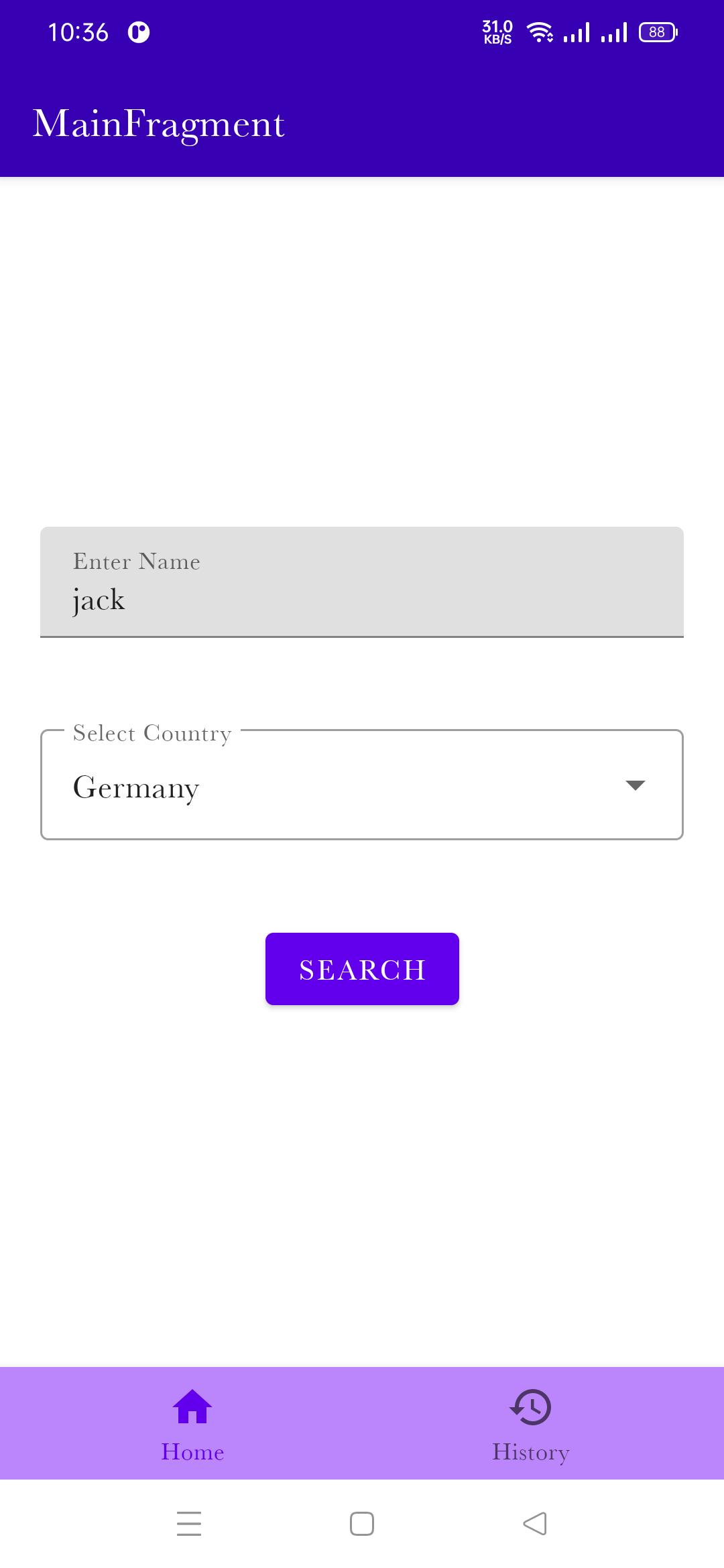
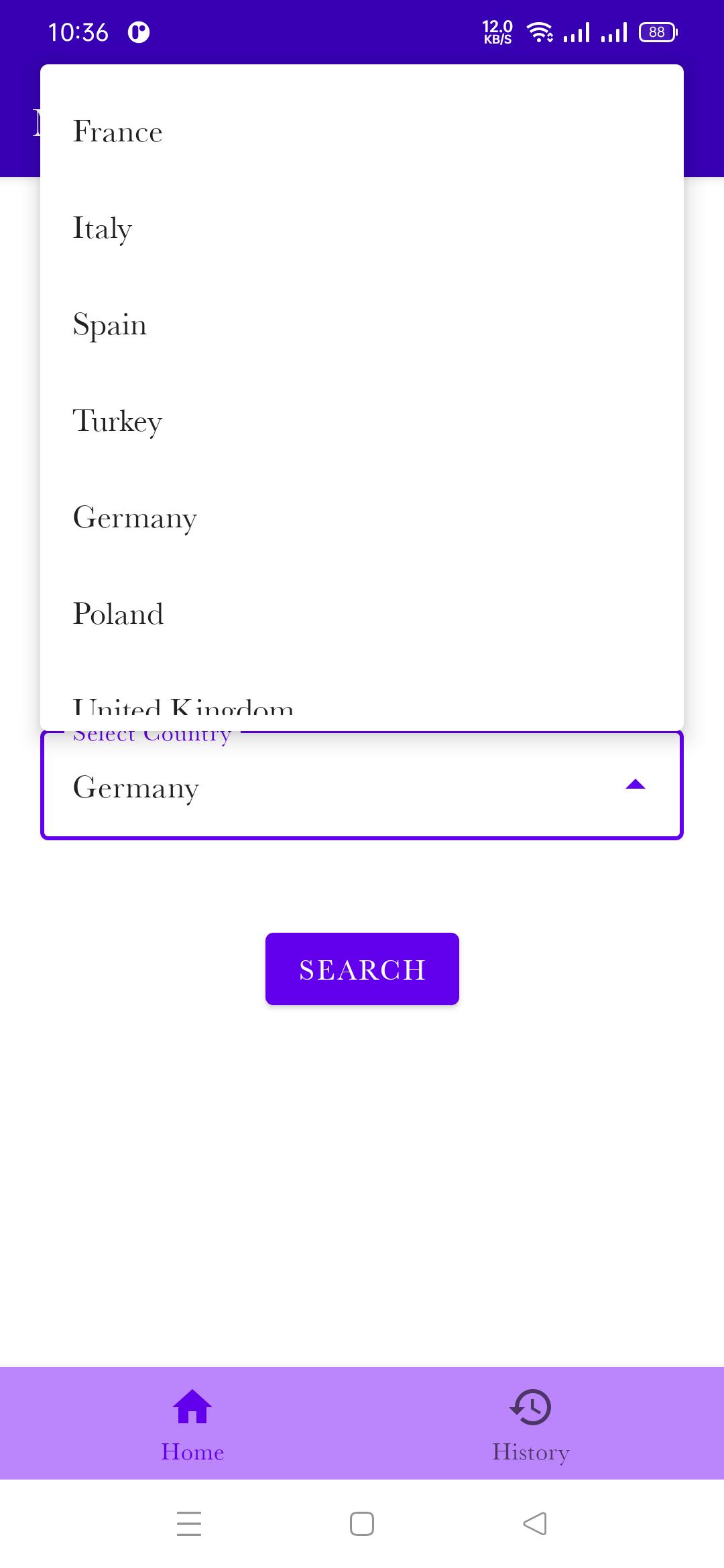
    Screenshot

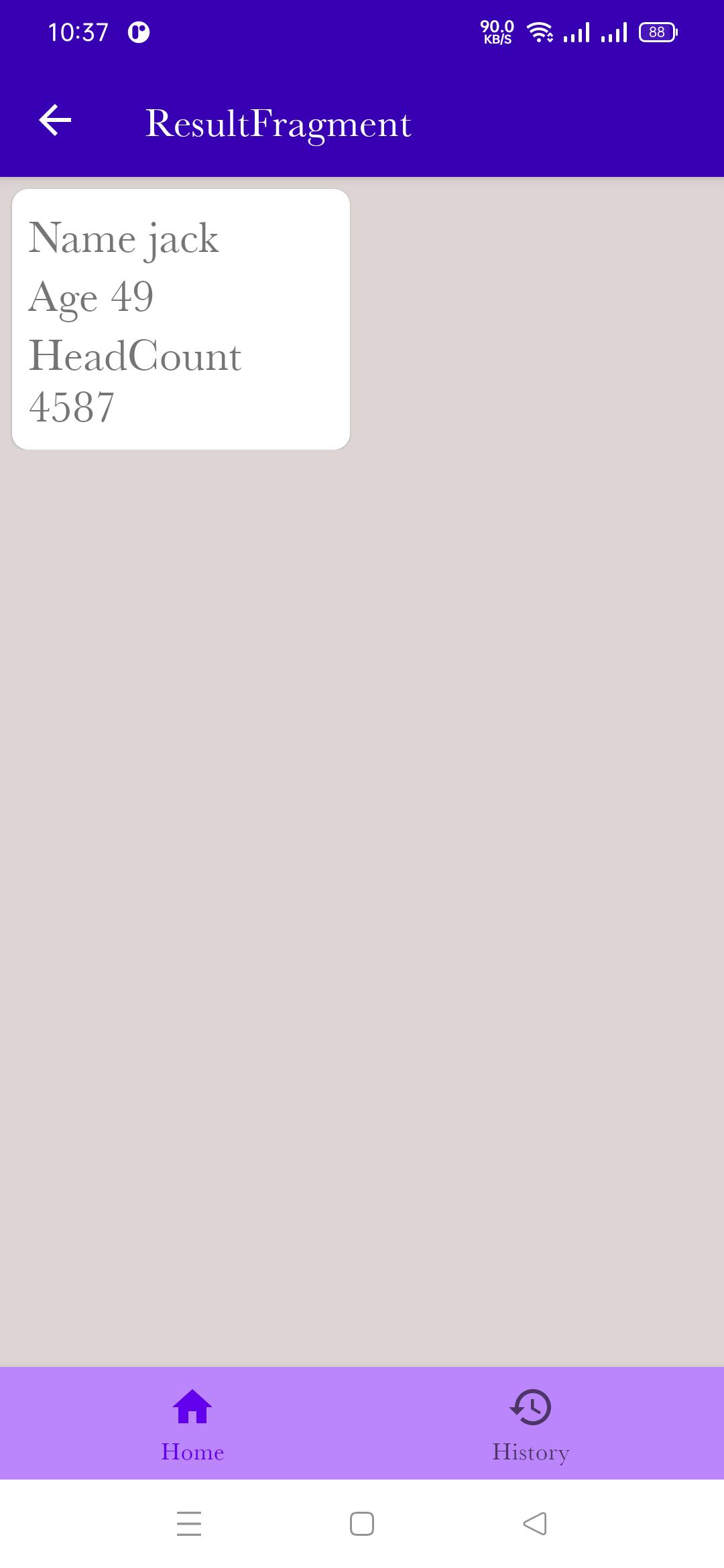
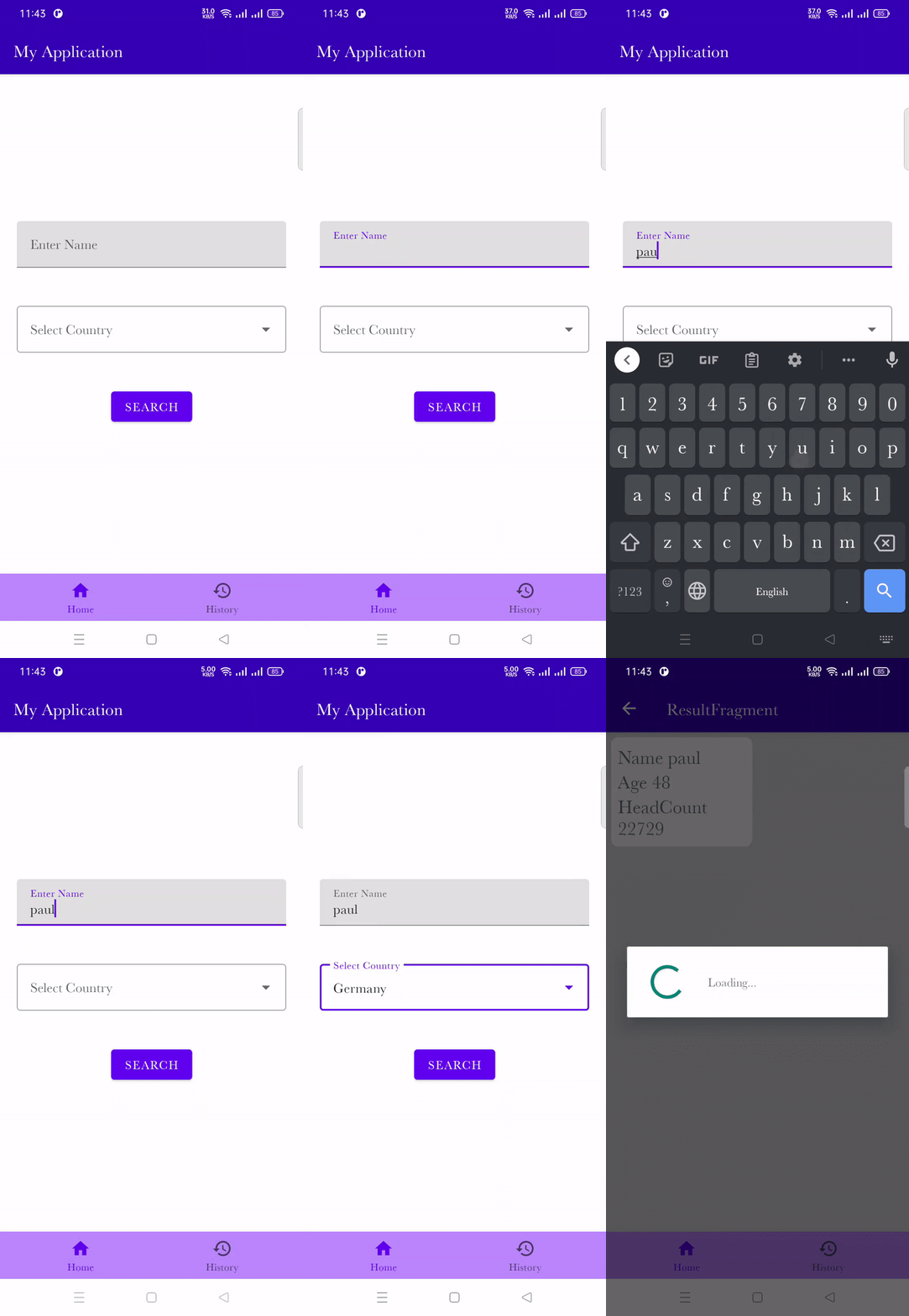
    Main Screenshot Main Select Lang Searched Data Result
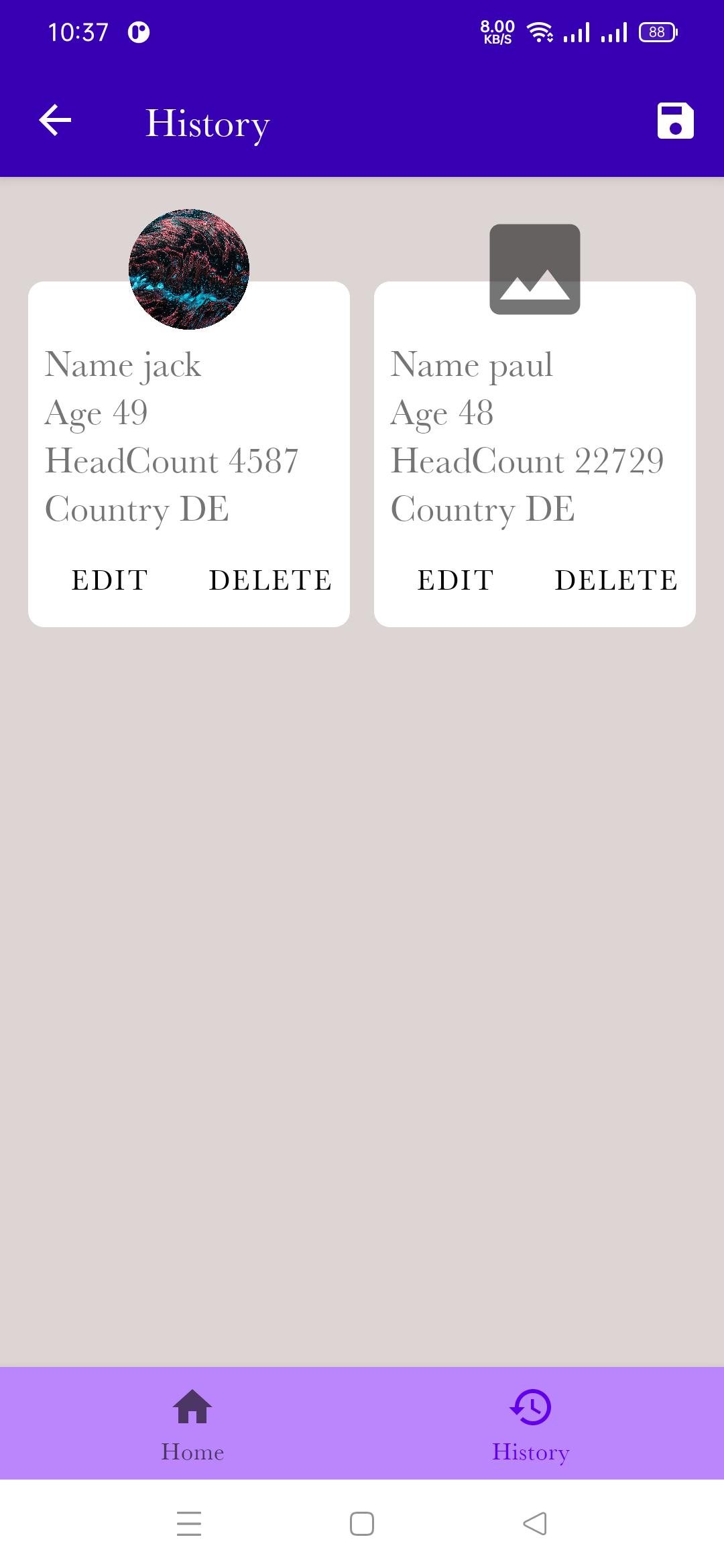
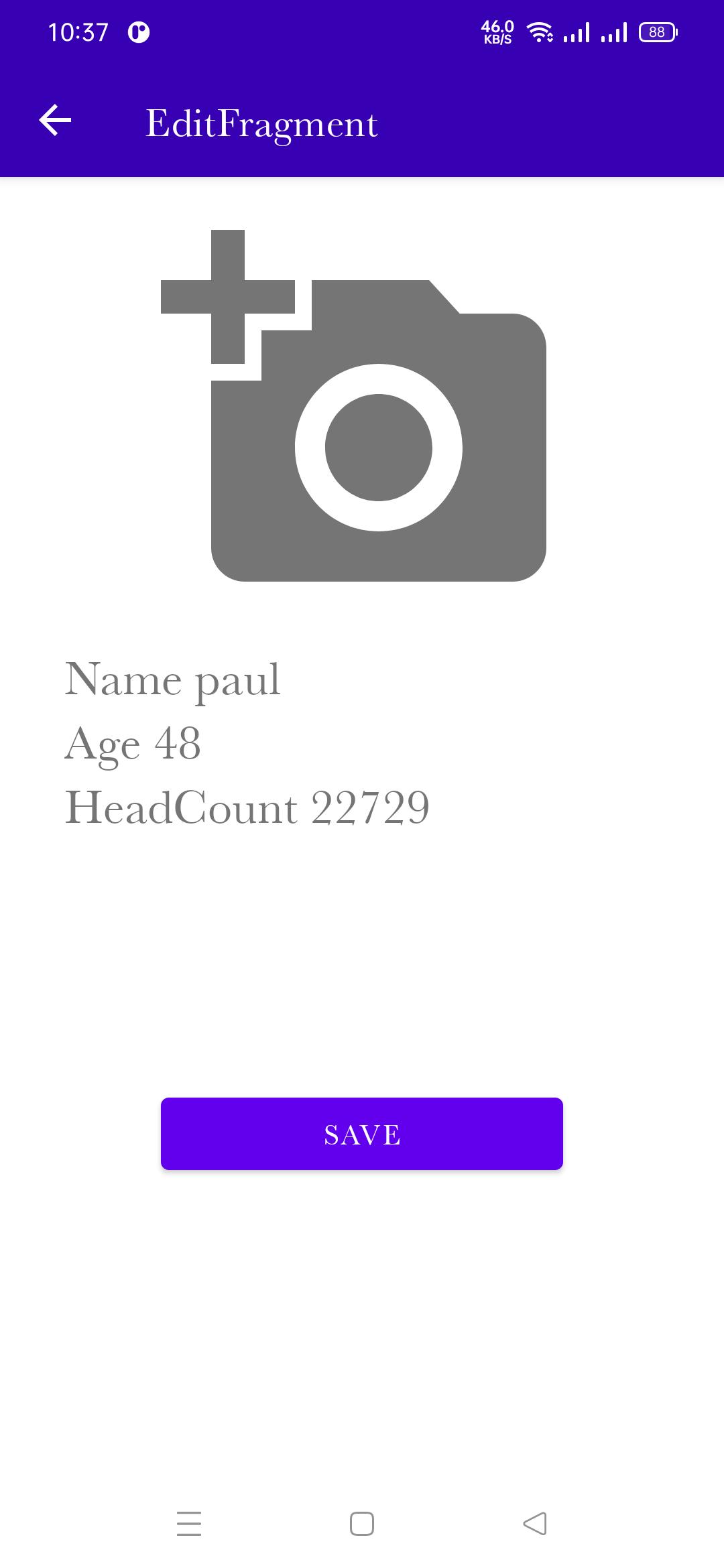
    Searched History Edit Img Change Whole Img Gif

    Where To go From here

    • Marvel Api Android Components Architecture in a Modular Word is a sample project that presents modern, 2020 approach to Android application development using Kotlin and latest tech-stack.
    • A UI/Material Design sample. The interface of the app is deliberately kept simple to focus on architecture. Check out Plaid instead.
    • A complete Jetpack sample covering all libraries. Check out Android Sunflower or the advanced Github Browser Sample instead.
    • A real production app with network access, user authentication, etc. Check out the Google I/O app, Santa Tracker or Tivi for that.
    • Model-View-ViewModel (ie MVVM) is a template of a client application architecture MVVM
    • MarvelHeroes is a demo application based on modern Android application tech-stacks and MVVM architecture.Fetching data from the network and integrating persisted data in the database via repository pattern.
    • Clean Archetecture This is a sample app that is part of a blog post I have written about how to architect android application using the Uncle Bob’s clean architecture approach.
    • Idiomatic KotlinContains all the code presented in the Idiomatic Kotlin tutorial series.

    UseCase

    You can reference the good use cases of this library in the below repositories.

    • Pokedex – 🗡️ Android Pokedex using Hilt, Motion, Coroutines, Flow, Jetpack (Room, ViewModel, LiveData) based on MVVM architecture.
    • DisneyMotions – 🦁 A Disney app using transformation motions based on MVVM (ViewModel, Coroutines, LiveData, Room, Repository, Koin) architecture.
    • MarvelHeroes – ❤️ A sample Marvel heroes application based on MVVM (ViewModel, Coroutines, LiveData, Room, Repository, Koin) architecture.
    • TheMovies2 – 🎬 A demo project using The Movie DB based on Kotlin MVVM architecture and material design & animations.
    • ForUiRef -A curated list of awesome Android UI/UX libraries.
    • AndroidUtilsSample Android Utils app contain simple code for starting a app
    • Android Sample Animation Simple animation sample project.
    • Backend Apis List

    • List Of Open ApisThis repo is a collection of AWESOME APIs for developers. Feel free to Star and Fork. Any comments, suggestions? Let us know. we love PRs :), please follow the awesome list.
    Visit original content creator repository
  • CodableWrapper

    Requirements

    Xcode Minimun Deployments Version
    Xcode15+ iOS13+ / macOS11+ 1.0+
    Xcode15- iOS13- / macOS11- 0.3.3

    About

    The project objective is to enhance the usage experience of the Codable protocol using the macro provided by Swift 5.9 and to address the shortcomings of various official versions.

    Feature

    • Default value
    • Basic type automatic convertible, between String Bool Number etc.
    • Custom multiple CodingKey
    • Nested Dictionary CodingKey
    • Automatic compatibility between camel case and snake case
    • Convenience Codable subclass
    • Transformer

    Installation

    CocoaPods

    pod 'CodableWrapper', :git => 'https://github.com/winddpan/CodableWrapper.git'
    Swift Package Manager

    https://github.com/winddpan/CodableWrapper

    Example

    @Codable
    struct BasicModel {
        var defaultVal: String = "hello world"
        var defaultVal2: String = Bool.random() ? "hello world" : ""
        let strict: String
        let noStrict: String?
        let autoConvert: Int?
    
        @CodingKey("hello")
        var hi: String = "there"
    
        @CodingNestedKey("nested.hi")
        @CodingTransformer(StringPrefixTransform("HELLO -> "))
        var codingKeySupport: String
    
        @CodingNestedKey("nested.b")
        var nestedB: String
    
        var testGetter: String {
            nestedB
        }
    }
    
    final class CodableWrapperTests: XCTestCase {
        func testBasicUsage() throws {
            let jsonStr = """
            {
                "strict": "value of strict",
                "autoConvert": "998",
                "nested": {
                    "hi": "nested there",
                    "b": "b value"
                }
            }
            """
    
            let model = try JSONDecoder().decode(BasicModel.self, from: jsonStr.data(using: .utf8)!)
            XCTAssertEqual(model.defaultVal, "hello world")
            XCTAssertEqual(model.strict, "value of strict")
            XCTAssertEqual(model.noStrict, nil)
            XCTAssertEqual(model.autoConvert, 998)
            XCTAssertEqual(model.hi, "there")
            XCTAssertEqual(model.codingKeySupport, "HELLO -> nested there")
            XCTAssertEqual(model.nestedB, "b value")
    
            let encoded = try JSONEncoder().encode(model)
            let dict = try JSONSerialization.jsonObject(with: encoded) as! [String: Any]
            XCTAssertEqual(model.defaultVal, dict["defaultVal"] as! String)
            XCTAssertEqual(model.strict, dict["strict"] as! String)
            XCTAssertNil(dict["noStrict"])
            XCTAssertEqual(model.autoConvert, dict["autoConvert"] as? Int)
            XCTAssertEqual(model.hi, dict["hello"] as! String)
            XCTAssertEqual("nested there", (dict["nested"] as! [String: Any])["hi"] as! String)
            XCTAssertEqual(model.nestedB, (dict["nested"] as! [String: Any])["b"] as! String)
        }
    }

    Macro usage

    @Codable

    • Auto conformance Codable protocol if not explicitly declared

      // both below works well
      
      @Codable
      struct BasicModel {}
      
      @Codable
      struct BasicModel: Codable {}
    • Default value

      @Codable
      struct TestModel {
          let name: String
          var balance: Double = 0
      }
      
      // { "name": "jhon" }
    • Basic type automatic convertible, between String Bool Number etc.

      @Codable
      struct TestModel {
          let autoConvert: Int?
      }
      
      // { "autoConvert": "998" }
    • Automatic compatibility between camel case and snake case

      @Codable
      struct TestModel {
          var userName: String = ""
      }
      
      // { "user_name": "jhon" }
    • Member Wise Init

      @Codable
      public struct TestModel {
          public var userName: String = ""
      
          // Automatic generated
          public init(userName: String = "") {
              self.userName = userName
          }
      }

      @Codable(wiseInit: false)
      public struct TestModel {
          public var userName: String = ""
      
          // Disable WiseInit Automatic generated
      }

    @CodingKey

    • Custom CodingKeys

      @Codable
      struct TestModel {
          @CodingKey("u1", "u2", "u9")
          var userName: String = ""
      }
      
      // { "u9": "jhon" }

    @CodingKeyIgnored

    • Ignored propery on encode and decode

      struct NonCodable {}
      
      @Codable
      struct TestModel {
          @CodingKeyIgnored
          var nonCodable: NonCodable?
      }

    @CodingNestedKey

    • Custom CodingKeys in nested dictionary

      @Codable
      struct TestModel {
          @CodingNestedKey("data.u1", "data.u2", "data.u9")
          var userName: String = ""
      }
      
      // { "data": {"u9": "jhon"} }

    @CodableSubclass

    • Automatic generate Codable class’s subclass init(from:) and encode(to:) super calls

      @Codable
      class BaseModel {
          let userName: String
      }
      
      @CodableSubclass
      class SubModel: BaseModel {
          let age: Int
      }
      
      // {"user_name": "jhon", "age": 22}

    @CodingTransformer

    • Transformer between in Codable / NonCodable model

      struct DateWrapper {
          let timestamp: TimeInterval
      
          var date: Date {
              Date(timeIntervalSince1970: timestamp)
          }
      
          init(timestamp: TimeInterval) {
              self.timestamp = timestamp
          }
      
          static var transformer = TransformOf<DateWrapper, TimeInterval>(fromJSON: { DateWrapper(timestamp: $0 ?? 0) }, toJSON: { $0.timestamp })
      }
      
      @Codable
      struct DateModel {
          @CodingTransformer(DateWrapper.transformer)
          var time: DateWrapper? = DateWrapper(timestamp: 0)
          
          @CodingTransformer(DateWrapper.transformer)
          var time1: DateWrapper = DateWrapper(timestamp: 0)
          
          @CodingTransformer(DateWrapper.transformer)
          var time2: DateWrapper?
      }
      
      class TransformTest: XCTestCase {
          func testDateModel() throws {
              let json = """
              {"time": 12345}
              """
      
              let model = try JSONDecoder().decode(DateModel.self, from: json.data(using: .utf8)!)
              XCTAssertEqual(model.time?.timestamp, 12345)
              XCTAssertEqual(model.time?.date.description, "1970-01-01 03:25:45 +0000")
      
              let encode = try JSONEncoder().encode(model)
              let jsonObject = try JSONSerialization.jsonObject(with: encode, options: []) as! [String: Any]
              XCTAssertEqual(jsonObject["time"] as! TimeInterval, 12345)
          }
      }

    Star History

    Star History Chart

    Visit original content creator repository