Author: u1sbxhkjoqp2

  • hexo-yam

    hexo-yam

    npm version Build Status codecov NPM Dependencies Known Vulnerabilities

    Yet Another Minifier for Hexo. Minify HTML, JS, CSS, SVG, XML and JSON. Compress static web assets using gzip, brotli and zstd.

    Table of contents

    Installation

    $ npm install --save hexo-yam

    Options

    minify:
      enable: true
      previewServer: true
      html:
      css:
      js:
      svg:
      gzip:
      brotli:
      xml:
      json:
    • enable – Enable the plugin. Defaults to true.
    • previewServer – Disable the plugin when running hexo server. Defaults to true.
    • html – See HTML section
    • css – See CSS section
    • js – See JS section
    • svg – See SVG section
    • gzip – See Gzip section
    • brotli – See Brotli section
    • xml – See XML section
    • json – See JSON section

    HTML

    minify:
      html:
        enable: true
        exclude:
    • enable – Enable the plugin. Defaults to true.
    • priority – Plugin’s priority. Defaults to 10. Set lower value to set higher priority and vice versa.
    • verbose – Verbose output. Defaults to false.
    • exclude – Exclude files. Support wildcard pattern(s) in a string or array.
    • globOptions – See globbing section.

    For more options, see HTMLMinifier.

    CSS

    minify:
      css:
        enable: true
        exclude:
          - "*.min.css"
    • enable – Enable the plugin. Defaults to true.
    • priority – Plugin’s priority. Defaults to 10.
    • verbose – Verbose output. Defaults to false.
    • exclude – Exclude files. Support wildcard pattern(s) in a string or array.
    • level – Optimization level. Defaults to 2.
    • globOptions – See globbing section.

    For more options, see clean-css.

    JS

    minify:
      js:
        enable: true
        exclude:
          - "*.min.js"
    • enable – Enable the plugin. Defaults to true.
    • priority – Plugin’s priority. Defaults to 10.
    • verbose – Verbose output. Defaults to false.
    • exclude – Exclude files. Support wildcard pattern(s) in a string or array.
    • compress – Compress options.
    • mangle – Mangle variable names. Defaults to true. Pass an object to specify mangle options.
    • output – Output options.
      • To retain comments, output: {comments: true}.
    • globOptions – See globbing section.

    For more options, see Terser.

    SVG

    minify:
      svg:
        enable: true
        include:
          - "*.svg"
          - "!*.min.svg"
    • enable – Enable the plugin. Defaults to true.
    • priority – Plugin’s priority. Defaults to 10.
    • verbose – Verbose output. Defaults to false.
    • include – Include files. Support wildcard pattern(s) in a string or array.
      • Exclude *.min.svg by default.
    • plugins – Plugin options.
      • Examples:
      plugins:
        # Retain comments
        removeComments: false
        # Do not remove unused ID attributes
        cleanupIds: false
      • For more options, see svgo.
    • globOptions – See globbing section.

    XML

    Remove whitespaces in xml.

    minify:
      xml:
        enable: false
        include:
          - "*.xml"
          - "!*.min.xml"
    • enable – Enable the plugin. Defaults to false.
    • priority – Plugin’s priority. Defaults to 10.
    • verbose – Verbose output. Defaults to false.
    • include – Include files. Support wildcard pattern(s) in a string or array.
      • Exclude *.min.xml by default.
    • removeComments – Remove comments in xml. Defaults to true.
    • globOptions – See globbing section.

    For more options, see minify-xml.

    JSON

    Remove whitespaces in json.

    minify:
      json:
        enable: false
        include:
          - "*.json"
          - "!*.min.json"
    • enable – Enable the plugin. Defaults to false.
    • priority – Plugin’s priority. Defaults to 10.
    • verbose – Verbose output. Defaults to false.
    • include – Include files. Support wildcard pattern(s) in a string or array.
      • Exclude *.min.json by default.
    • globOptions – See globbing section.

    Gzip

    minify:
      gzip:
        enable: true
        include:
          - "*.html"
          - "*.css"
          - "*.js"
          - "*.txt"
          - "*.ttf"
          - "*.atom"
          - "*.stl"
          - "*.xml"
          - "*.svg"
          - "*.eot"
          - "*.json"
    • enable – Enable the plugin. Defaults to true.
    • priority – Plugin’s priority. Defaults to 10.
    • verbose – Verbose output. Defaults to false.
    • include – Include files. Support wildcard pattern(s) in a string or array.
      • Support one-liner, include: ['*.html','*.css','*.js'].
      • Must include asterisk and single quotes. .html is invalid. '*.html' is valid.
    • globOptions – See globbing section.
    • level – Compression level; lower value may results in faster compression but slightly larger (compressed) file. Range 1-9. Defaults to 9, or the value of zlib.constants.Z_BEST_COMPRESSION

    Brotli

    minify:
      brotli:
        enable: true
        include:
          - "*.html"
          - "*.css"
          - "*.js"
          - "*.txt"
          - "*.ttf"
          - "*.atom"
          - "*.stl"
          - "*.xml"
          - "*.svg"
          - "*.eot"
          - "*.json"
    • enable – Enable the plugin. Defaults to true.
    • priority – Plugin’s priority. Defaults to 10.
    • verbose – Verbose output. Defaults to false.
    • include – Include files. Support wildcard pattern(s) in a string or array.
    • globOptions – See globbing section.
    • level – Compression level. Range 1-11. Defaults to 11, or the value of zlib.constants.BROTLI_MAX_QUALITY

    Zstd

    minify:
      zstd:
        enable: false
        include:
          - "*.html"
          - "*.css"
          - "*.js"
          - "*.txt"
          - "*.ttf"
          - "*.atom"
          - "*.stl"
          - "*.xml"
          - "*.svg"
          - "*.eot"
          - "*.json"
    • enable – Enable the plugin. Defaults to false.
    • priority – Plugin’s priority. Defaults to 10.
    • verbose – Verbose output. Defaults to false.
    • include – Include files. Support wildcard pattern(s) in a string or array.
    • globOptions – See globbing section.
    • level – Compression level. Range 1-22. Defaults to 3, or the value of DEFAULT_LEVEL

    Globbing

    Use “globOptions” to customise how glob patterns match files. Refer to micromatch for available options.

    • basename is enabled by default, unless the pattern has a slash.
    • basename is disabled depending on each pattern.
    • This means the following options would work,
    exclude:
      - "*foo.html" # basename is enabled
      - "**/bar/*/*.html" # basename is automatically disabled
      - "*baz.css" # basename is enabled
    globOptions:
      basename: true # default
    • This behaviour doesn’t apply to pattern that starts with ! (negation).
    • This limitation only applies to include: option used in svg, gzip and brotli.
    • This means the following options would not work,
    include:
      - "!foo.svg"
      - "!**/bar/*/*.svg"
    globOptions:
      basename: true
    • basename will stay disabled, if explicitly disabled in “globOptions”.

    Credits

    All credits go to the following work:

    Visit original content creator repository
  • ABC_neuroimaging

    ABC fMRI

    Introduction

    This is a series of EPrime (https://pstnet.com/products/e-prime/), Python, AFNI (https://afni.nimh.nih.gov/), FreeSurfer (https://surfer.nmr.mgh.harvard.edu/), and SLURM scripts built to streamline functional neuroimaging data analysis for the Aging Brain Cohort project at the University of South Carolina (ABC@UofSC) while leveraging the Hyperion supercomputing cluster. The current pipeline is designed specifically for the reading (‘fMRI_fam’) task which consists of single word presentations. However, in the future we will be adding scripts to generate word- or phrase-level timing files for the listening (‘passage_fMRI’) task, consisting of stories and passages presented auditorily to participants. There are many experimental questions that one can ask while analyzing these tasks due to a wide range of continuous and categorical variables of interest. Here, we have created an example pipeline for analysis of major contrasts (e.g. words vs. nonwords, pictures vs. words, foreign language passages vs. English passages), and we have provided notes advising users on how the pipeline may be modified to suit their more specific experimental questions.

    Recommended Software

    Python 2.7 or later, with Pandas 1.0.3 or later

    AFNI_20.1.02 or later

    netpbm packages: pnmcat, pbmtext, pnmscale, pbmtopgm, (pnmcomp OR pamcomp)

    FreeSurfer v6.0.0, or Freesurfer/2020-beta module if using the Hyperion Cluster

    Access to Hyperion supercomputing cluster (optional but highly recommended)

    Stimuli and Design

    For information about the stimuli, please see the ‘stimuli_and_design’ directory. Within this, there is a detailed README which describes the experimental design, stimuli, and provides examples of variables of interest that could be investigated. Also included in this directory are the EPrime scripts used for experimental presentation and .csv documents listing the stimuli and their associated psycholinguistic variables. Especially important is the ‘master_word’ directory, which provides the coding system that we have implemented for categorical variables of interest in the reading (‘fMRI_fam’) task. Understanding the coding system is vital for creating the fMRI timing files used by AFNI (Step #4 in the ‘Pipeline Flow’, described in sections below).

    Pipeline Flow

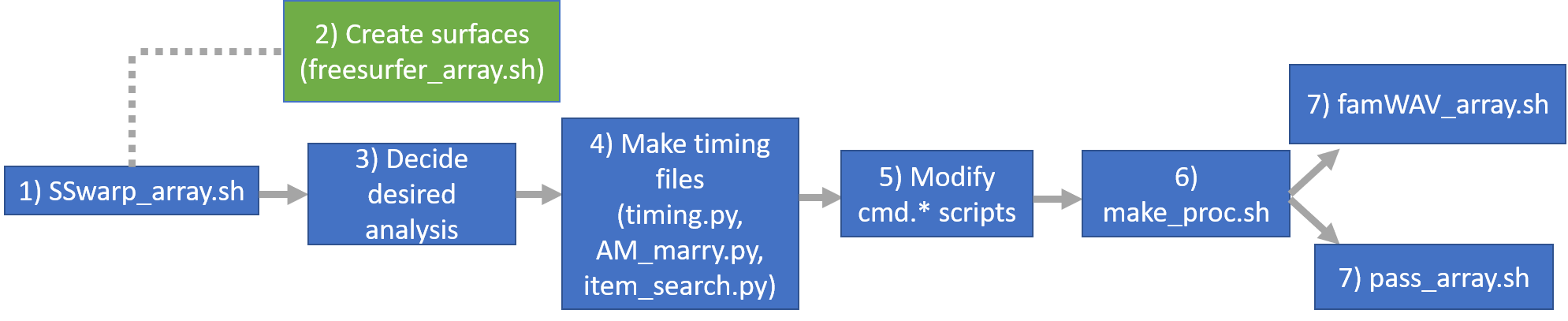
    flowchart

    The figure above shows the order in which the pipeline should be executed. Steps #4 and greater will depend on the investigator’s desired analysis, and those scripts will need to be edited in order to reflect the specific experimental question (more information on this is provided in subsequent sections).

    Steps and associated scripts

    Step #1: Subject-specific anatomical alignment to standardized space

    SSwarp_array.sh

    This is a SLURM batch array submission script calling AFNI’s @SSwarper command, which 1) aligns each subject’s anatomical T1 to a standard space target and 2) skull-strips that anatomical volume. This is AFNI’s recommendation for ‘pre-preprocessing’ (https://www.biorxiv.org/content/10.1101/308643v1.full.pdf), and is vital for proper execution of Steps #5 and above of our pipeline (actual analysis of the fMRI data). The script enters each desired subject’s data directory (named ‘1001’, ‘1002’, etc.) and applies @SSwarper to their anatomical scan (assumed to be named ‘T1.nii’), warping it to the MNI152_2009_template_SSW.nii.gz template. ‘giant_move’ and ‘deoblique’ are specified here in case the subject’s head was very tilted within the scanner.

    Within each subject’s directory, output files should include (where $ = the subject’s number):

    • anatDO.$.nii
    • anatU.$.nii
    • anatUA.$.nii
    • anatUAC.$.nii
    • anatS.$.nii
    • anatSS.$.nii
    • anatQQ.$.nii
    • anatQQ.$.aff12.1D
    • anatQQ.$WARP.nii
    • anatQQ.$.nii
    • AM$.jpg
    • MA$.jpg
      The .jpg files are used to visually inspect the success of @SSwarper, while anatQQ.$.nii, anatQQ.$.aff12.1D, and anatQQ.$WARP.nii are called in Steps #5 and above of the pipeline.

    Step #2: Create brain surfaces

    freesurfer_array.sh

    This is a SLURM batch array submission script calling FreeSurfer’s ‘recon-all’ command (https://surfer.nmr.mgh.harvard.edu/fswiki/recon-all), which performs all of FreeSurfer’s standard cortical reconstruction processes using a subject’s anatomical scan (assumed to be named ‘T1.nii’). The script enters each desired subject’s data directory (named ‘1001’, ‘1002’, etc.), creates a new FS output directory (e.g. ‘1001_FS’), and places the output into that directory (example output files listed here: https://surfer.nmr.mgh.harvard.edu/fswiki/ReconAllOutputFiles). ‘parallel’ and ‘openmp #’ must be specified here in order to use multiple Hyperion cores. The # following openmp should match the number of cores you wish to use in the batch script.

    Step #3: Decide desired analysis

    Here, one must determine what type of analysis they wish to conduct, including which categorical or continuous variables of interest they want to choose. The scripts in the following sections have been written using very broad contrasts (i.e. words vs. nonwords, words vs. pictures, or foreign language vs. English passages), but a large number of more specific analyses are possible using our multiple psycholinguistic variables and categorical coding system provided in /stimuli_and_design/master_word/.

    Step #4: Create timing files

    The following Python scripts use EPrime’s experimental output files for each subject (named ‘fMRI_fam-$subjectnumber-1-Export.txt’) to generate AFNI-formatted .txt timing files for response times and stimuli onset, which will be used in subsequent steps. The scripts should be executed in a single directory where every subject’s EPrime output file is stored. One should modify the scripts to reflect their desired analysis.

    timing.py

    This script should be used if your desired analysis is purely categorical (i.e. no continuous psycholinguistic variables included). The current version creates separate timing .txt files for each subject for response times to all stimuli and onset times for the following categories: words, nonwords, pictures, concrete words, abstract words, high frequency words, and low frequency words. Categories can be added or deleted at the user’s discretion.

    AM_marry.py

    This script should be used if your desired analysis contains continuous variables (e.g. Age of acquisition, semantic diversity, etc.) for the purpose of ‘marrying’ stimuli onset times with the continuous variable associated with each specific stimulus. The current version, for each subject, marries our continous ‘Freq’ (word frequency) variable to the onset times for following categories: all words, concrete words, abstract words, high frequency words, and low frequency words. Output is .txt timing files that can be used with AFNI’s amplitude modulation regression (https://afni.nimh.nih.gov/pub/dist/doc/misc/Decon/AMregression.pdf), which is AFNI’s method of finding voxels whose activation is modulated by continuous variables. For example, using amplitude modulation and AM_marry.py for the all word category and frequency variable, you could find voxels that 1) are activated by words, regardless of frequency and 2) are modulated by the continuous frequency variable.

    item_search.py

    This script will be used for item-wise analysis, wherein an activation map will be created for each item, averaging across all of the subjects who saw that specific item. The current version creates a Pandas Dataframe where the rows are every stimulus seen by every participant thus far, and the columns represent each individual subject. The cells show the onset times at which the subjects saw a specific stimulus. Also included is the ability to search for a specific stimulus by its name, outputting a .csv file that contains the onset times for that single item, getting rid of all the subjects who did not see that item.

    Step #5: Modify the cmd.* scripts as desired

    Note: If using the cluster, you do not actually run these scripts. Step #6 will call these scripts as needed.

    These scripts assume that Steps #1 and #4 have been successfully completed. Within each subject’s directory should be the .txt timing files, the output of @SSwarper, and ‘fMRI_fam.nii’ and ‘fMRI_passage.nii’. The template MNI152_2009_template_SSW.nii.gz should be saved in a master directory with its path specified within the cmd.* scripts (via ‘set tpath’).

    Two sample cmd.* scripts are provided:

    • cmd.ap.ABC_fam_make_proc
    • cmd.ap.ABC_pass_make_proc

    These are scripts that will be used to generate AFNI’s proc analysis scripts (Step #6), with the ‘fam’ version being built for the reading task and the ‘pass’ version for the listening task. For the reading task, built-in contrasts include words vs. nonwords and words vs. pictures, while the listening task only contains foreign language vs. English passages. These scripts were closely based on AFNI’s current analysis recommendations (https://www.biorxiv.org/content/10.1101/308643v1.full.pdf). Users should feel free to modify these scripts as they see fit, and will need to modify their scripts based on the contrasts that they have chosen for their analysis.

    Step #6: Generate ANFI proc scripts

    make_proc.sh

    This is a batch submission script which will run the cmd.* scripts from Step #5, generating AFNI proc scripts for every subject listed within the cmd.* scripts. Example output can be found in **proc.ABC_1006.

    Step #7: Run the analysis

    famWAV_array.sh

    pass_array.sh

    This step contains two scripts, depending on if the investigator is analyzing data from the reading (famWAV_array.sh) or listening (pass_array.sh) task. These are batch array submission scripts which will run all of the proc scripts for each subject that were generated in Step #6. Separate results directories will be generated for each subject in the master directory.

    Visit original content creator repository

  • Team_Profile_Generator

    Team Profile Generator

    Description

    This application was created to give managers easy access to their team’s contact information.

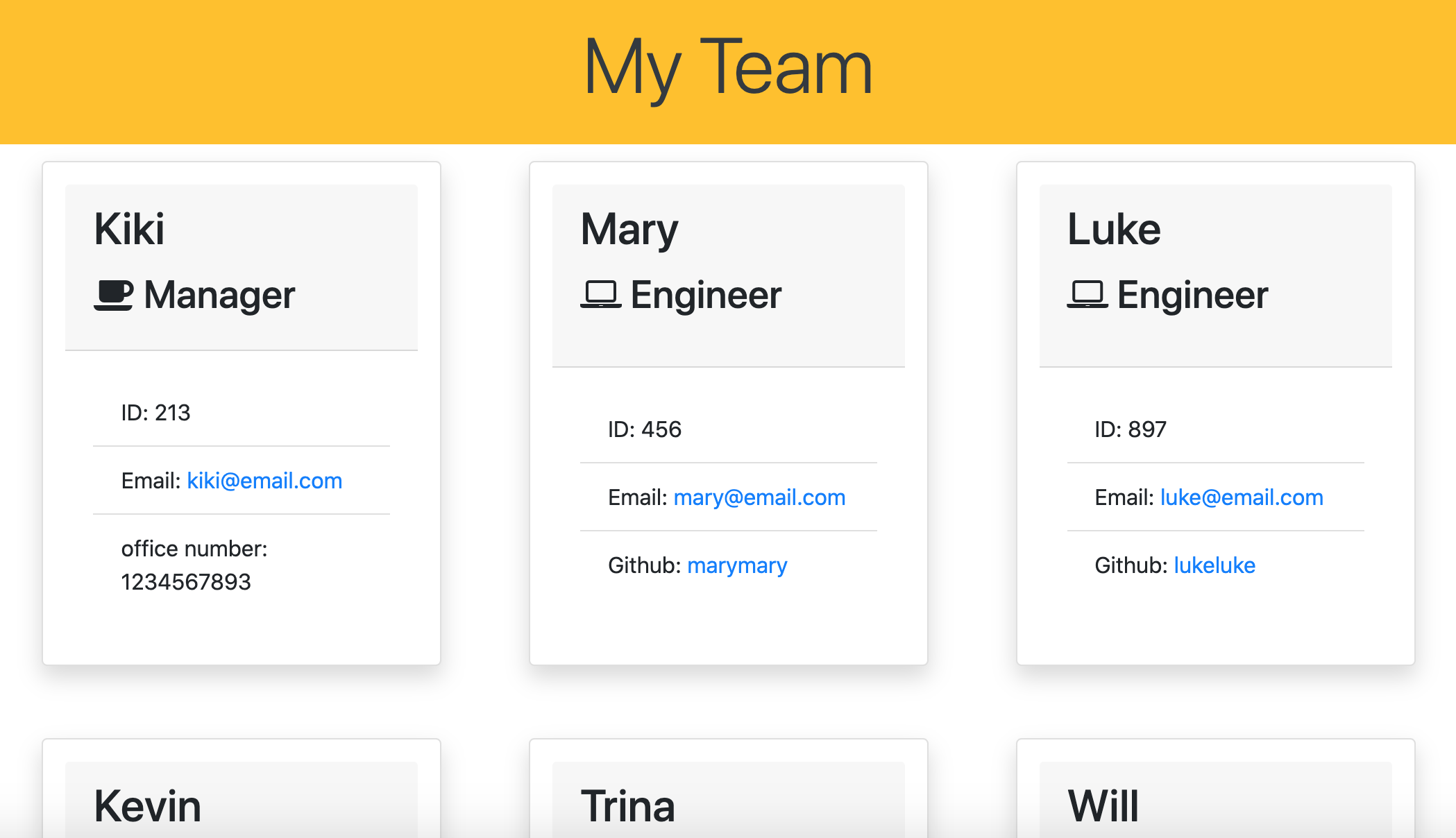
    Screen Shot 2021-06-22 at 10 21 31 AM

    Installation / Usage instructions

    • To utilize this application you will need Node.js.
    • Clone this repository and open it within VS Code or any text editor of your choosing.
    • Right-click on the index.js file within your explorer dock and select “open in integrated terminal”
    • In your terminal type ‘NPM install’ and hit enter.
    • Upon completion of the installation mentioned above, type ‘node index.js’ into the terminal, hit enter, and you will begin to receive a series of prompts.
    • Once you have completed the series of prompts your team profile will be generated.

    Video demonstration

    video demonstration: team generator

    Tech

    • Node.js
    • Jest package
    • Inquirer package
    • Javascript
    • Bootstrap
    • JQuery
    • HTML
    • CSS

    Test

    This application was created using test-driven development.
    You can run these tests by going to the test folder, opening an integrated terminal, and typing in “npm test”.

    Please follow the link below for a walkthrough video on how to run the tests mentioned above:
    video demonstration: tests

    MIT license

    Copyright (c) 2021 Olivia Lopez

    Permission is hereby granted, free of charge, to any person obtaining a copy
    of this software and associated documentation files (the “Software”), to deal
    in the Software without restriction, including without limitation the rights
    to use, copy, modify, merge, publish, distribute, sublicense, and/or sell
    copies of the Software, and to permit persons to whom the Software is
    furnished to do so, subject to the following conditions:

    The above copyright notice and this permission notice shall be included in all
    copies or substantial portions of the Software.

    THE SOFTWARE IS PROVIDED “AS IS”, WITHOUT WARRANTY OF ANY KIND, EXPRESS OR
    IMPLIED, INCLUDING BUT NOT LIMITED TO THE WARRANTIES OF MERCHANTABILITY,
    FITNESS FOR A PARTICULAR PURPOSE AND NONINFRINGEMENT. IN NO EVENT SHALL THE
    AUTHORS OR COPYRIGHT HOLDERS BE LIABLE FOR ANY CLAIM, DAMAGES OR OTHER
    LIABILITY, WHETHER IN AN ACTION OF CONTRACT, TORT OR OTHERWISE, ARISING FROM,
    OUT OF OR IN CONNECTION WITH THE SOFTWARE OR THE USE OR OTHER DEALINGS IN THE
    SOFTWARE.

    Questions

    Contact me @ https://github.com/DoubleLForce5 and/or lopez.olivia17@outlook.com

    Visit original content creator repository

  • tigerlab

    This app uses django rest framework to import csv files into the TeamScore Model on the backend. It is utilizing a postgres backend as well as a redis server to implement caching. It is also using HTMX for forms that enable team score objects to be added, edited and deleted. The front end utilizes bootstrap 5.

    Below are the links to the documentation that was referred to in implementing this webapp:

    HTMX for forms : https://htmx.org/

    redis for caching : https://redis.io/

    HTMX

    HTMX forms were implemented instead of standard Crispy forms to utilize immediate page updates without any refreshes using just HTML and minimal javascript instead of writing custom AJAX, Websockets or Server Event scripts.

    Redis

    To start the webapp manually, please have a redis server runnning and check your port connection to make sure it matches with the configurations on the .env file under the Cache section. If you are on a mac you can use homebrew and run:

    brew install redis

    brew services start redis

    Test your connection by keying in PING, you should receive PONG as an output.

    Postgres

    All sensitive information such as database password, secret keys and allowed hosts have been decoupled using python-decouple. These are stored in the .env file. Attached to this repository is a sample .env.example file, please rename this file to a .env file with your db parameters, secret key and allowed hosts.

    To start the application manually (for the Docker image build scroll to the end)

    Once redis is running, and a postgres db, db username and db password has been set up. Clone the repository and update the .env file with the appropriate settings, if you are in need of generating a secret key for the django web app you may retrieve one from : https://miniwebtool.com/django-secret-key-generator/

    Virtual environment setup

    Create a python3 virtual environment in the root directory of the application, it is best to stick to the root directory as when this application is pushed to the production or staging server and is utilizing the Jenkinsfile for automated deployments, it is configured to look for the python virtual environment in the root directory (or you may choose to update this).

    To create a virtual environment and activate it on a Mac:

    python3 -m venv ./venv

    source ./venv/bin/activate

    Once your virtual environment has been activated you may install all libraries and dependencies for this application from the requirements.txt file.

    pip install -r requirements.txt

    Static files

    To ensure that your static files are collected and a static folder is created in the root of your application run:

    python manage.py collectstatic

    When prompted key in Y for “Yes”

    You should see a static folder in the root of your local repository

    Run migrations

    Next, run all migrations to ensure your tables are created in the database which you connected to using your .env file setup.

    python manage.py makemigrations

    python manage.py migrate

    Create a superuser

    Run the following commands and input your desired username and password:

    python manage.py createsuperuser

    Run app

    You may now run:

    python manage.py runserver

    Hit Ctrl + C to stop your server from running the application locally.

    In case you would like to get a view of how mobile responsive the application is and how it works from a mobile device or an ipad. You may choose to run the application on your ip address at port 8000.

    On a mac get your ip address by running:

    ipconfig getifaddr en0

    You should get your public IP address in this format :

    190.16x.7x.1xx

    Add this IP address to your ALLOWED_HOSTS in your .env file.

    Now run the following command on your IP address at port 8000:

    python manage.py runserver 190.16x.7x.1xx:8000

    Your phone or ipad should be connected to the same WiFi your laptop is connected to. You may view the app on your mobile browser using this link:

    190.16x.7x.1xx:8000

    Logging

    This application also uses Python’s default basicConfig logging, to log events for the API. You can find these outputs in the logging.log file generated. Refer to this for tracebacks should there be any errors with the core API to import CSV files.

    Tests

    To run tests:

    python manage.py test

    Logging is also implemented for tests, the output can be found in testing.log. All test files are found in individual app folders, they were not compiled into a single folder due to time constraints.

    Jenkins File

    The attached Jenkinsfile assumes that there will be both a staging and production server assuming nginx and gunicorn will be used to serve the webapp.

    Dockerfile

    To run the docker image of this application, install docker into your local environment

    You may refer to their documentation : https://docs.docker.com/desktop/install/mac-install/

    IMPORTANT for Docker Build

    Once you have docker installed, it is important that you change these parameters on your .env file to follow the name of the service for postgres and redis on the docker-compose file.

    DB_HOST=db

    REDIS_HOST=redis

    To build an image of the application run:

    docker compose build

    docker compose up -d

    docker-compose exec tigerlab python3 manage.py migrate

    You may view the application running on docker at:

    localhost:8000

    TO further check files within your docker container

    docker exec -t -i tigerlab-app /bin/bash

    To execute any commands to your docker container, for e.g. to create a superuser:

    docker-compose exec tigerlab python3 manage.py createsuperuser

    TO stop your docker container

    The command below will stop the tigerlab-app container but will not remove the container or the tigerlab image built from your build command previously:

    docker-compose stop

    If you wish to stop and remove the container and image, run the command below:

    docker-compose down

    If you have previously started the container without specifing the environment variables, volumes would be created for the default postgres db and your .env file will be skipped, to fix this remove the volumes attached to your tigerlab image

    TO remove all volumes:

    docker volume rm $(docker volume ls -q)

    TO remove a specific volume:

    docker volume rm $(volumename)

    Things that could be improved

    Due to time constraints, I was not able to improvise on the data fetch event for the dashboard page using htmx, right now it is triggered every 1 second to check for new file uploads. Ideally it should implement a data fetch on an event change like the analytics page does to reduce server load.

    Caching could be implemented for the dashboard page as well. Right now it is only implemented on the analytics page. More tests could be done.

    On the OUTPUT page and DASHBOARD PAGE, if a huge amount of data is loaded the tables will be an endless scroll with data lag, it is best to implement Pagination should there be a huge amount of data uploads, the pagination can be implemented in pages or an infinite scroll with AJAX calling on data as the user scrolls instead of a one time data dump.

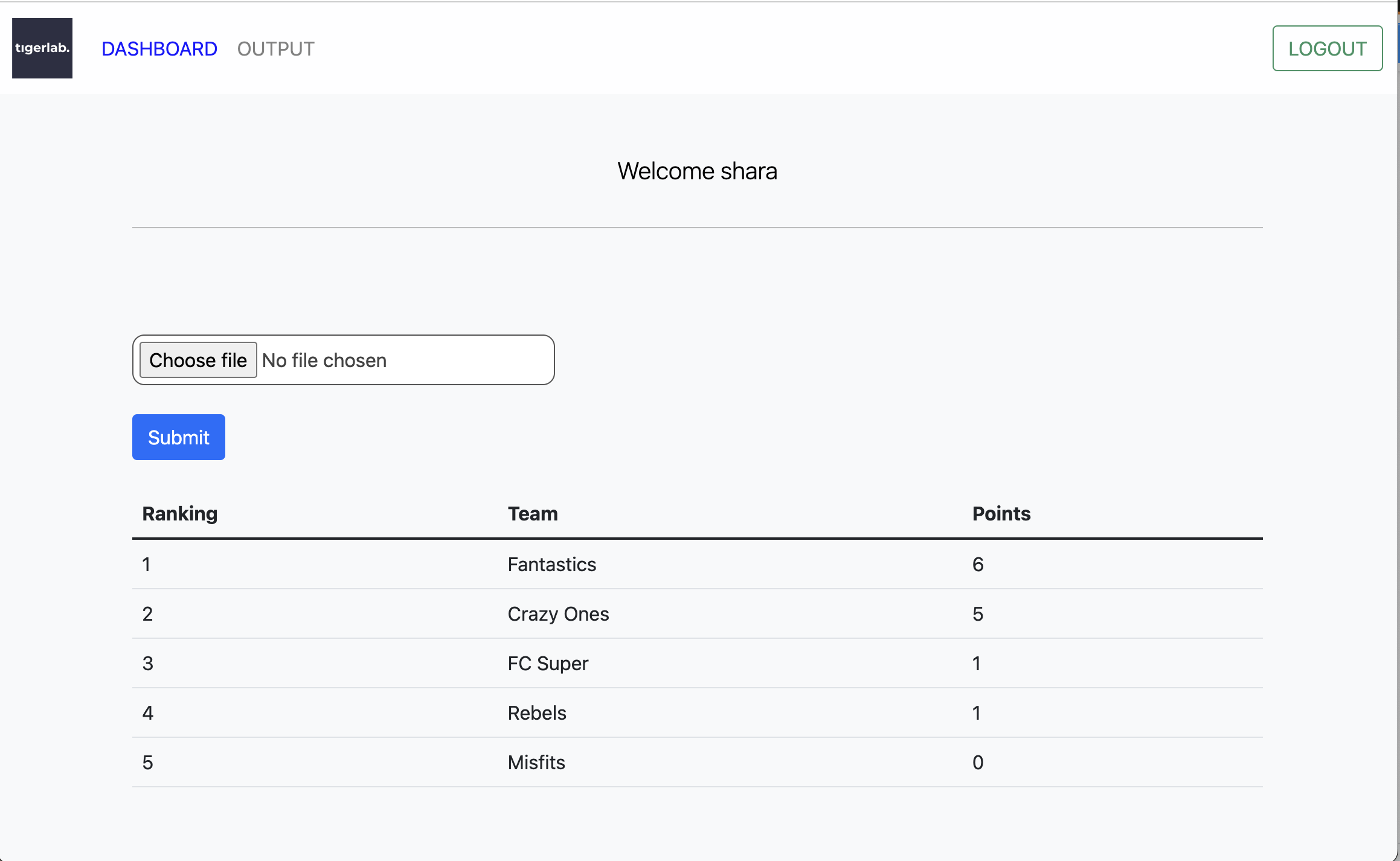
    Dashboard for file submit, ranking, and points

    dashboard

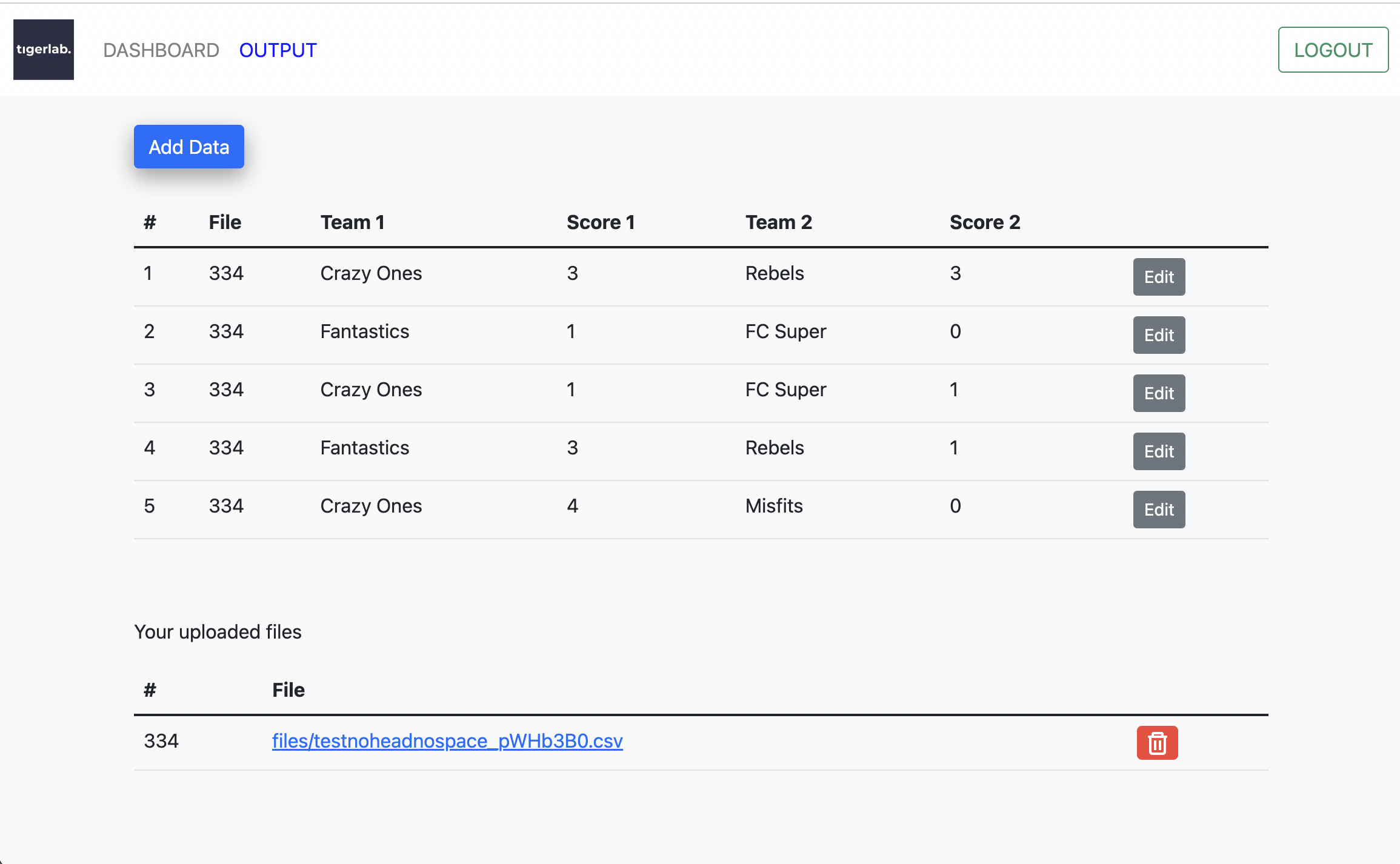
    CSV File upload output

    output

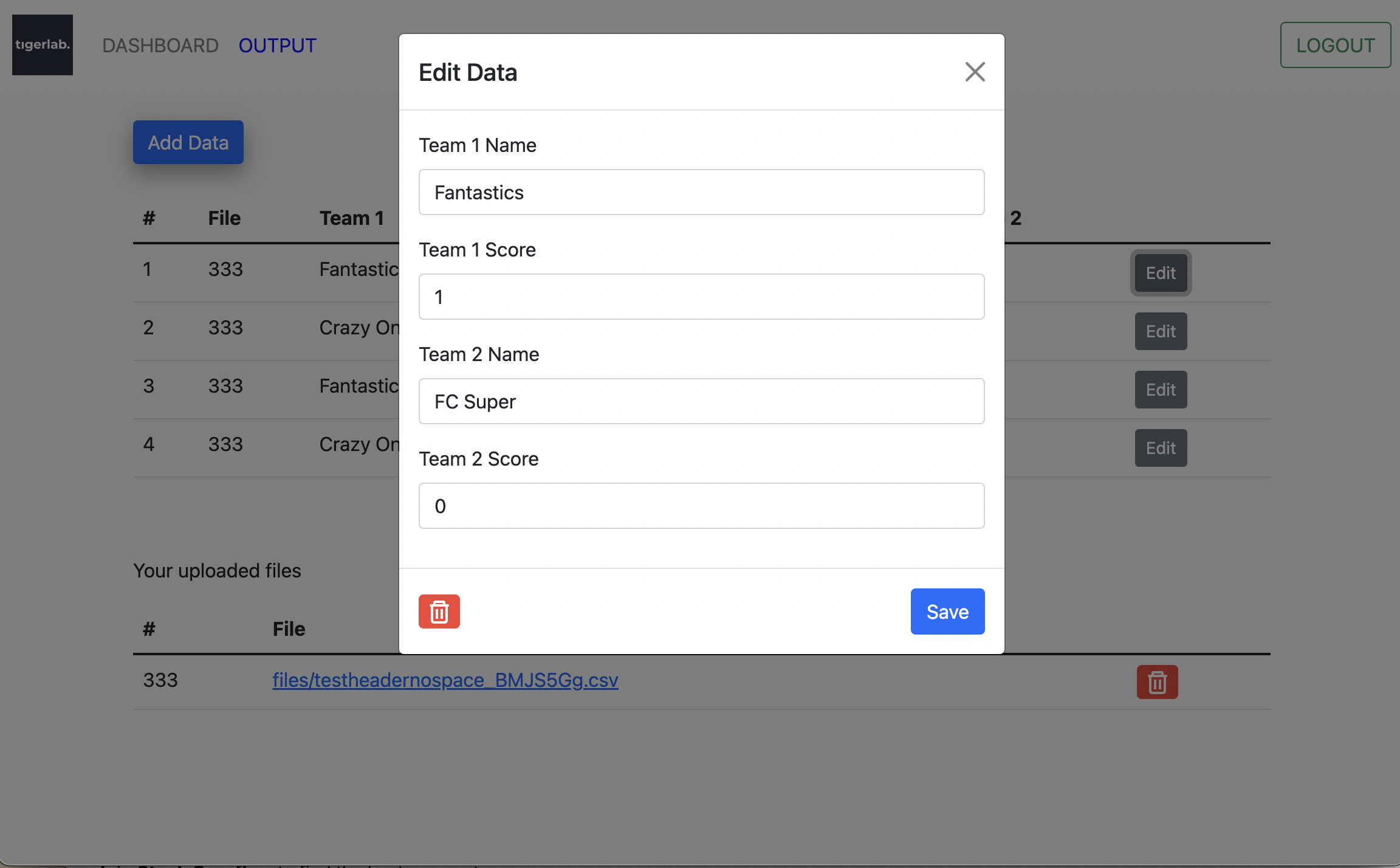
    Edit Data Points

    editdata

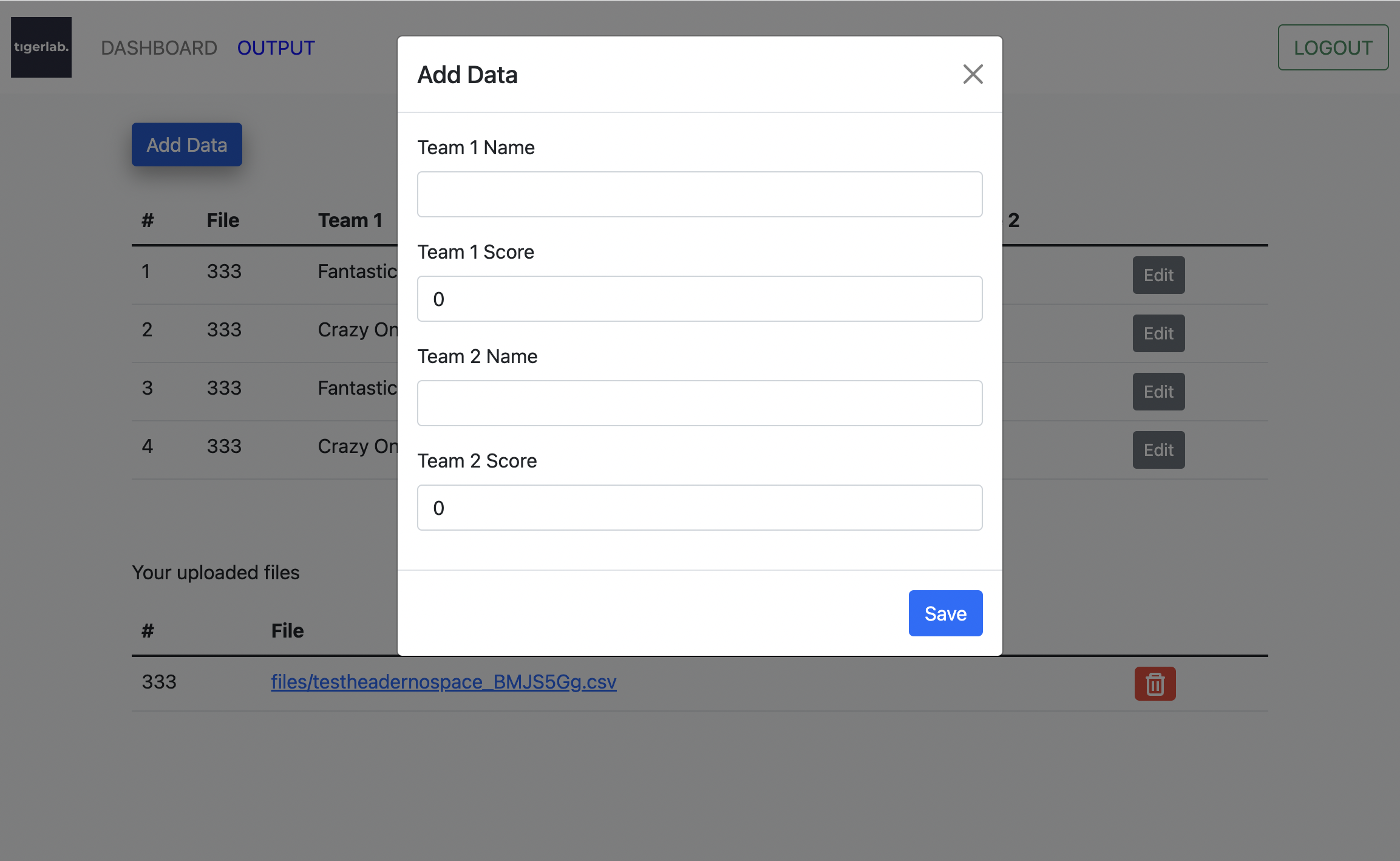
    Add Data Points

    addata

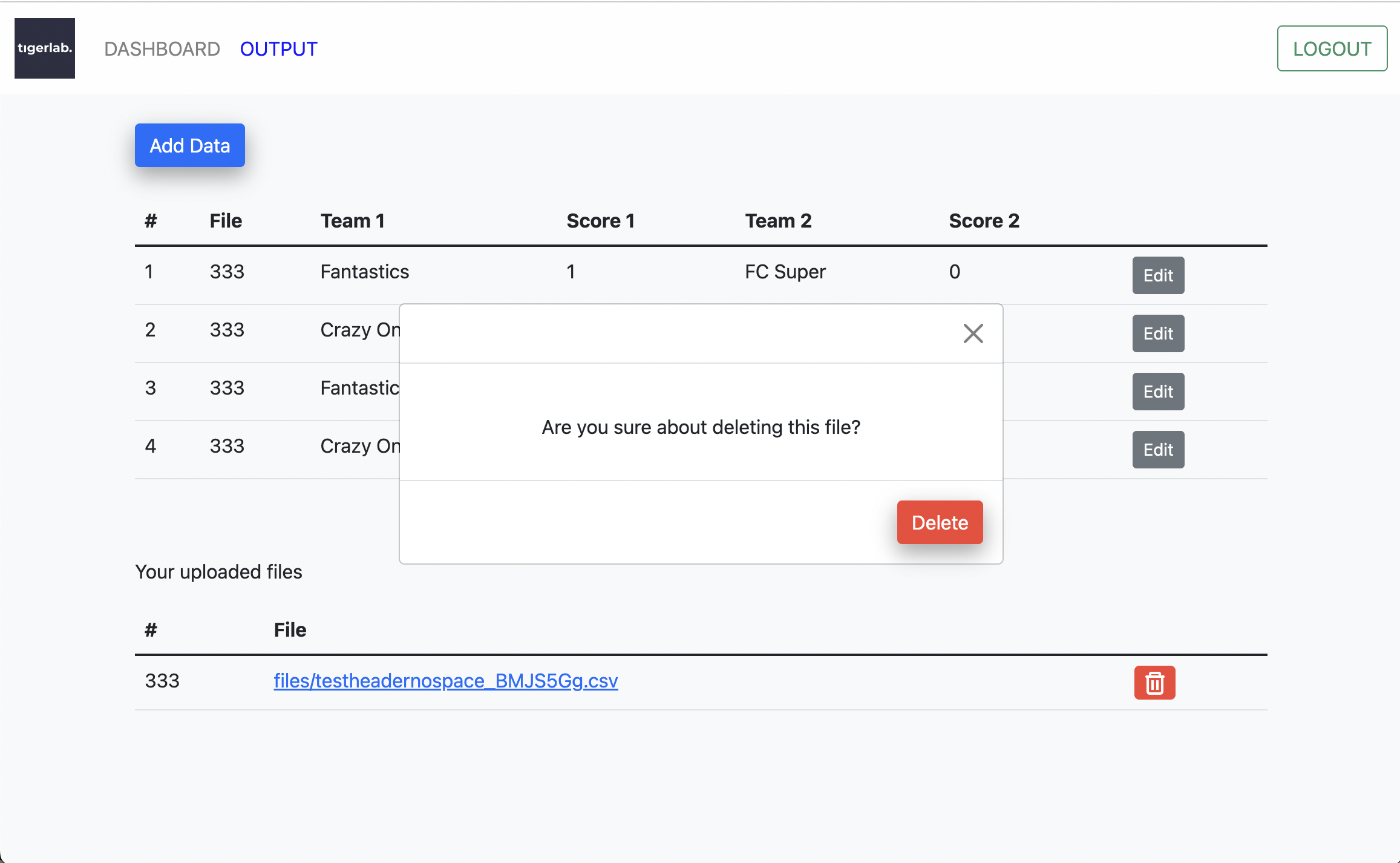
    Modal pop up to confirm file deletes

    confirmdelete

    Visit original content creator repository
  • BotFramework-Hubot

    Botframework adapter for Hubot

    npm version Build Status Coverage Status

    Installation

    Use hubot in Bot Framework Supported Channels

    1. Install hubot. Make sure to npm install --save hubot-botframework to add this module.

      • Authorization and Card-based interactions are in alpha testing and are not part of the published npm package, so to use these features, clone or download this repository and install it as a local dependency of your hubot. Then after running npm install for your hubot, in the local copy of the BotFramework adapter, run npm install --production then run npm install --save <<relative-path-to-your-hubot>>/node_modules/hubot to point the local copy of the BotFramework adapter to your hubot.
    2. Create a Botframework Registration by completing the Bot Registration Page. Store the created app id and app password for use later.

    3. Configure the required environment variables, and run the command ./bin/hubot -a botframework to run the bot from your local computer.

    You can then interact with your hubot through any Bot Framework supported channel.

    Additional Steps to Use Hubot in Microsoft Teams

    1. Create a Microsoft Teams app package (.zip) to upload in Teams. We recommend using the manifest editor in App Studio for Microsoft Teams. Include the bot’s app id and password in the bots section.

    2. In Microsoft Teams, navigate to the Store and select Upload a custom app. Select the zipped Teams App Package, and install the bot for personal and/or team use.

    You can then interact with hubot through a personal chat or by @mentioning the name of the uploaded custom app in a Team. In personal chats, the bot’s name can be dropped from messages(ping or hubot ping). In Teams, @mention the bot and omit the bot’s name from the command (@myhubot ping).

    Common Differences in Hubot running in Slack, Hipchat, other chat platforms and MS Teams

    1. Microsoft Teams uses a push model to send messages. This means that hubots that want to communicate in Teams MUST expose themselves via a public HTTPS endpoint that Microsoft Teams services can push messages to.
    2. The bot MUST be @ mentioned in a channel to receive a message. Microsoft Teams does NOT send all messages to the bot.

    Global Variables

    You can configure the Hubot BotFramework adapter through environment variables.

    Required (obtained from the BotFramework portal):

    1. BOTBUILDER_APP_ID – This is the Id of your bot.
    2. BOTBUILDER_APP_PASSWORD – This is the secret for your bot.

    Optional:

    1. BOTBUILDER_ENDPOINT – Sets a custom HTTP endpoint for your bot to receive messages on (default is /api/messages).

    2. HUBOT_TEAMS_ENABLE_AUTH – When set to true, restricts sending commands to hubot to a specific set of users in Teams. Messages from all non-Teams channels are blocked. Authorization is disabled by default.

    3. HUBOT_TEAMS_INITIAL_ADMINS – Required if HUBOT_TEAMS_ENABLE_AUTH is true. A comma-separated list of user principal names (UPNs). The users on this list will be admins and able to send commands to hubot when the hubot is first run with authorization enabled.

    Channel Specific Variables

    These variables will only take effect if a user communicates with your hubot through Microsoft Teams.

    Optional:

    1. HUBOT_OFFICE365_TENANT_FILTER – Comma seperated list of Office365 tenant Ids that are allowed to communicate with your hubot. By default ALL Office365 tenants can communicate with your hubot if they sideload your application manifest.

    Optional Authorization for Microsoft Teams:

    NOTE: The UPNs used for authorization are stored in the hubot brain, so brain persistence affects the use of HUBOT_TEAMS_INITIAL_ADMINS as described below.

    Authorization restricts the users that can send commands to hubot to a defined set of Microsoft Teams users. Authorization is currently only supported for the Teams channel, so when enabled, messages from all other channels are blocked. To maximize back compatibility, authorization is disabled by default and must be enabled to be used.

    Configuring authorization

    Authorization is set up using the HUBOT_TEAMS_ENABLE_AUTH and HUBOT_TEAMS_INITIAL_ADMINS environment variables.

    • HUBOT_TEAMS_ENABLE_AUTH controls whether authorization is enabled or not. If the variable is not set, authorization is disabled. To enable authorization, set the environment variable to true.

    • HUBOT_TEAMS_INITIAL_ADMINS is required if authorization is enabled. This variable contains a comma-separated list of UPNs. When the hubot is run with authorization enabled for the first time, the users whose UPNs are listed will be admins and authorized to send commands to hubot. These UPNs are stored in the hubot brain. After running hubot with authorization enabled for the first time:

      • If your hubot brain is persistent, to change the list of authorized users, first delete the stored list of authorized users from your hubot’s brain then change HUBOT_TEAMS_INITIAL_ADMINS to the new list. Also consider using the hubot-msteams script package to dynamically control authorizations.

      • If your hubot brain isn’t persistent, the HUBOT_TEAMS_INITIAL_ADMINS list will be used to set admins every time hubot is restarted.

    Card-based Interactions for Microsoft Teams

    Add screenshots (create an images folder to store them in)

    Hubot is great, but hubot without needing to type in whole commands and with less typos is even better. Card-based interactions wrap hubot responses into cards and provide buttons on the card containing useful follow-up commands. To run a follow-up command, simply click the button with the command. If user input is needed, another card is shown with fields for input, and the rest of the command is constructed for you.

    Currently, card based interactions are supported for the hubot-github package.

    Defining new card-based interactions

    Adding new card-based interactions has two steps:

    1. Add entries to HubotResponseCards located in src/hubot-response-cards.coffee. Each entry is from a regex to an array of follow up commands.

      • The regex should map to the command that you want to generate a card for with wildcards for the hubot’s name and regexes for each user input. See the hubot-github entries for examples.
      • The follow up queries should match the key for the follow up command in HubotQueryParts.
    2. Add entries to HubotQueryParts located in src/hubot-query-parts.coffee. Each entry is from the command to two arrays containing the text and input parts of a command. These arrays are used to construct the query with any user inputs to send to hubot.

      • textParts contains the text surrounding any user inputs, if a command has no user input, it contains one string in textParts. Note that the first entry of textParts starts with ‘hubot’
      • inputParts contains representations of each user input in a command, if any. The text is used to prompt the user for input. A special syntax can used for inputs with finite choices to create a dropdown selector. In this case, a / is used followed by the choices separated by the word ” or “. See the hubot-github entries for examples.

    Once these entries have been added, cards with follow up commands will be generated for the commands added to HubotResponseCards. For menu cards used to initiate card-based interactions for any command in a script library, use the hubot-msteams library.

    Contributing

    This project has adopted the Microsoft Open Source Code of Conduct. For more information see the Code of Conduct FAQ or contact opencode@microsoft.com with any additional questions or comments

    Visit original content creator repository
  • solution-base

    SolutionBase

    SolutionBase is a social platform for users to address global sustainability issues like global warming, plastic free etc. Platform allows user to contribute their ideas/solutions to different topics and problems. Read more about sustainable development goals here.

    Live Site

    SolutionBase

    Design Documents

    SolutionBase Wiki

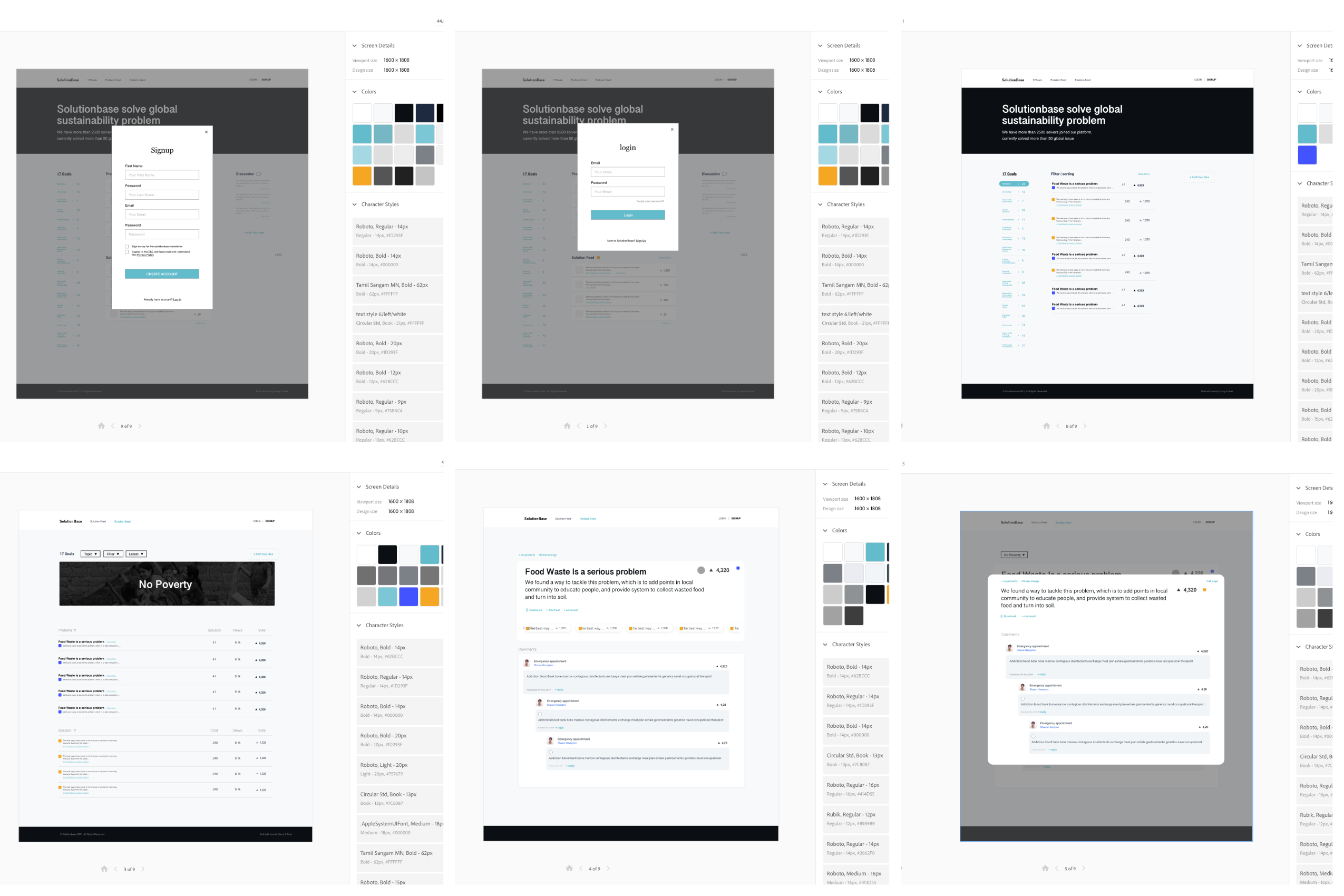
    Wireframes and Style Guide

    Design
    alt text

    Site Features

    Sorting

    One main feature is users can filter and sort posts in multiple combination. Their preferences are stored so that when they returned to homepage, it is still in sorted order and/or filtered.

    1. We have a slice of state to keep track of sorting and filtering, separated by topic page and homepage.

    2. For sorting, we use thunk action updateSort to update Redux store, and then, depending on the key, either fetchTopic or fetchPosts using the data object, which becomes the parameter Topic or Post controller receives.

    // frontend/actions/filter_actions.js
    export const updateSort = (id, data, key) => dispatch => {
      dispatch(receiveSort(id, data, key));
      if (key === 'topic') {
        return fetchTopic(id, data)(dispatch);
      } else if (key === 'homepage') {
        return fetchPosts(data)(dispatch);
      }
    };
    1. The data object gets evaluated in the Topic or Post controller in index and calls Post’s class method sort_filter. This method checks the sorting type and calls the responsible class methods, which then uses ActiveRecord to query the database.

    # app/models/post.rb
    def self.sort_filter(sort)
      case sort[:sort]
      when 'most recent'
        self.most_recent(sort[:topic_id], sort[:post_type])
      when 'most comments'
        self.most_commented(sort[:topic_id], sort[:post_type])
      when 'most votes'
        self.most_votes(sort[:topic_id], sort[:post_type])
      end
    end
    1. When posts are received, we also receive a postOrder array, which is used to map posts in the sorted order.

    2. Every sort and filter action is stored and updated in Redux store and passed down to a component with mapStateToProps. So component dispatches updateSort on mount with the latest filter and sorting parameters.

    Nested Comments

    To have children comments nested under a parent comment, we use recursion and Javascript object to achieve better time complexity.

    If we have 1000 comments c1, we do not want to iteratre all 1000 comments checking if its c2.parent_comment_id equals to c1.id. This will be 1000 * 1000 comparisons and an O(n^2) algorithm.

    We can achieve this with O(n) time, where n is total number of comments.

    1. When we receive a post, we receive an array of all_comments, which is stored in the comments slice of Redux store. In a selector function that takes in state and the currently viewed post as arguments, we create an object with keys as parent_comment_id and values arrays of their children comments. Comments with no parent have null as their keys.

    // frontend/reducers/selectors.js
    export const selectCommentsForPost = ({comments}, post) => {
      // handle cases where there are no comments or we have not fetchPost
      if (!Object.keys(comments).length) return {};
      if (post.commentIds.filter(commentId => !comments[commentId]).length) return {};
      // create map-like object
      let hash = {};
      post.commentIds.map(commentId => comments[commentId])
        .forEach((comment) => {
          let parent = comment.parent_comment_id;
          let children = hash[parent];
          let update;
          if (children) {
            update = { [parent] : [...children, comment] }
          } else {
            update = { [parent] : [comment] }
          }
          hash = Object.assign({}, hash, update);
        })
      return hash;
    }
    1. In the PostShow component, we have a renderComments method that takes a parent comment ID as an argument. This method lookups the children comments in the hash object created above and map over all the children comments. It makes a recursive call with each child comment ID to get its children comments. We call the function with null (comments with no parent) first, which will go through all their children and then their grandchildren and so on.

    // frontend/components/posts/post_show.jsx
      function renderComments(id) {
        return (
          <>
            {comments[id].map(comment => (
              <>
                {singleComment(comment)} // returns <CommentIndexItem />
                <ul>
                  {comments[comment.id] && <li>{renderComments(comment.id)}</li>}
                </ul>
              </>
            ))}
          </>
        )
      }
      ...
      return (
        ...
        renderComments(null)
        ...
      )

    Usage

    Development

    1. Front end

      Use the npm package manager to install dependencies in root directory.

      npm install
      npm run webpack
    2. Back end

      Install rails dependencies in root directory, setup Postgres database and start development server.

      rails bundle exec install
      # create the database, load the schema, and initialize it with the seed data
      rails db:setup
      rails s

      You can view the full application on localhost:3000.

    Built With

    Front-end:

    • React – Front end framework
    • Redux – State management tool used with React
    • jQuery – DOM Manipulation
    • AJAX – AJAX used for API calls
    • Javascript – Language for site functionality
    • React-Bootstrap – – Used for advanced styling and design system
    • Material-UI – Used for advanced styling
    • Styled-Component – Used for custom styling React components
    • CSS3 – Used in conjunction with Material-UI for styling
    • HTML5 – Used for general structure of webpage

    Back-end:

    Potential Additions/ Unsolved Issues

    • Lazy loading / Infinite scrolling
    • Profile page
    • Text based search
    • Live time update new posts, comments and their vote counts with WebSockets

    Visit original content creator repository

  • shanghai-lockdown-covid-19

    Coronavirus statistics data in Shanghai lockdown

    Crawl & Parse Data

    No entire COVID-19 statistics data of the Shanghai lockdown period can be found in the JHU CSSE COVID-19 Data project. Data of project shanghai-lockdown-covid-19 is crawled from Shanghai Government‘s public website, began on 19/03/2022, the date of my place lockdown.

    Shanghai is divided by the Huangpu River into two parts, the Pudong area, and the Puxi area. Pudong’s lockdown began on 28/03/2022 firstly, and Puxi started its shutdown on 01/04/2022.

    Shanghai Government has announced its city-wide lockdowns will be gradually lifted from 1 June on 16/05/2022, after 15 out of 16 districts achieving “social dynamic Zero-Covid cases”. My place alse reopened on the same day, but with some limits.

    Shanghai returned to normal on 1 June, the epidemic wave in the city is under control effectively and this project has stopped updating at 2 June.

    Data files can be found in directory data, including:

    • JSON
    • CSV
    • Excel
    • Sqlite

    Notice: I think db files are too large, and they will make this repo hard to clone. If you want to get the latest db files, uncomment the line in db.py and run the file to generate all db files.

    Update Frequency

    I have disabled the update workflow at 2 June, this project will not be updated anymore.

    This project will be updated every 15min between 8am and 10pm GMT+8 by GitHub Actions.

    Get The Code and Run on Your Machine

    git clone --depeth=1 https://github.com/lewangdev/shanghai-lockdown-covid-19.git

    Statistics

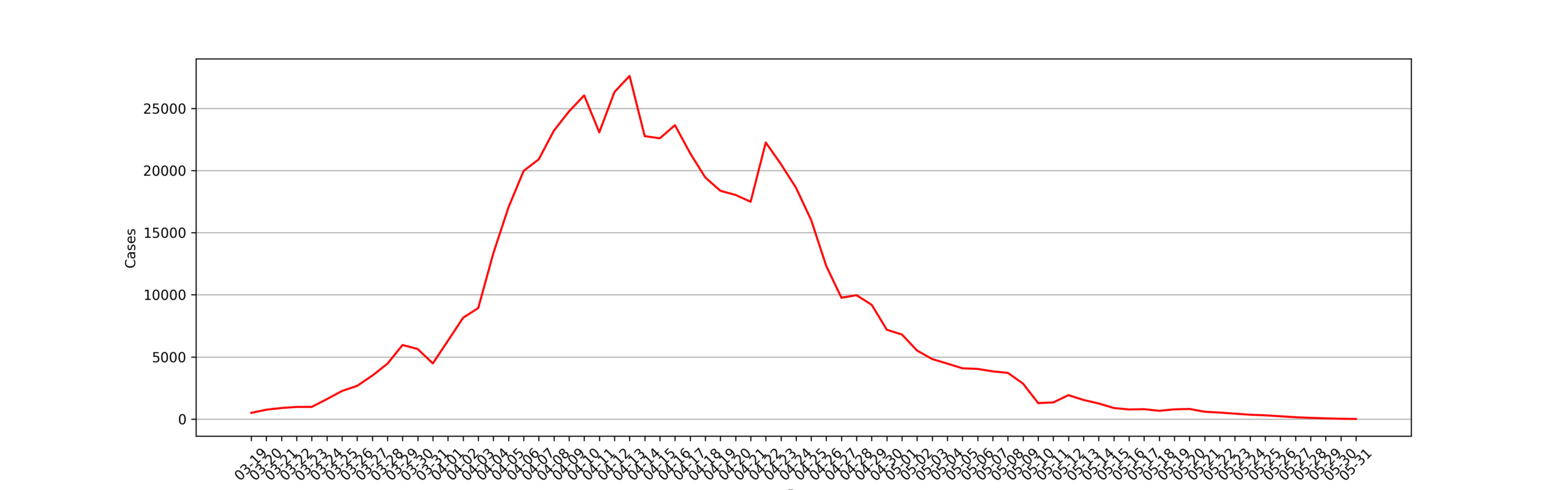
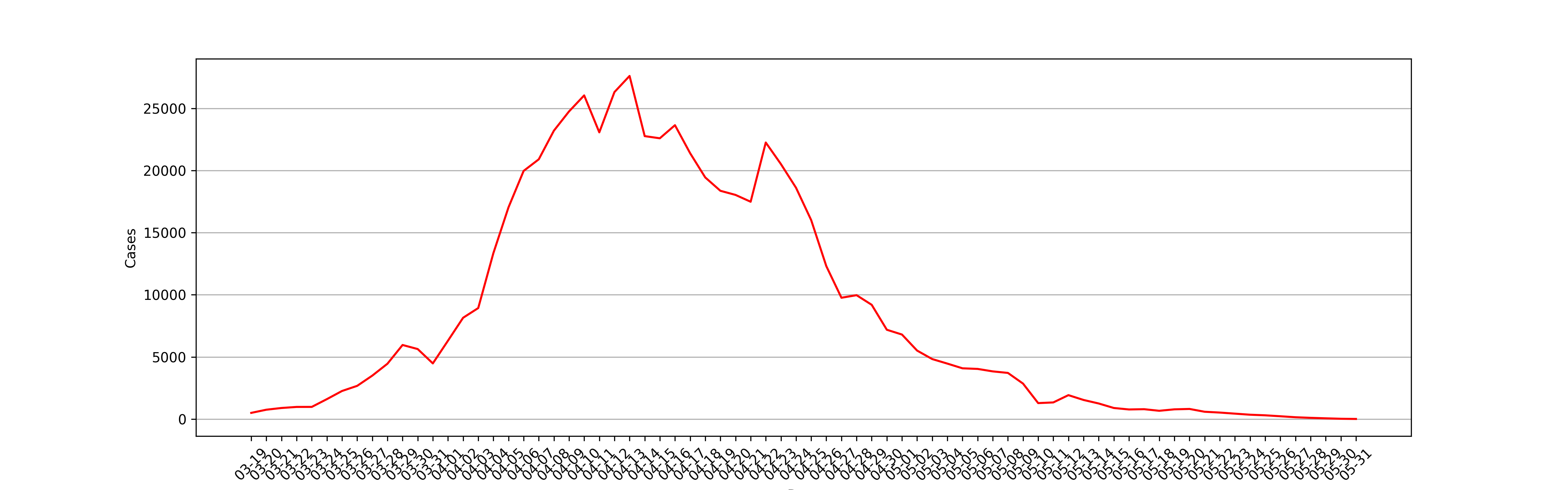
    New cases

    New cases

    Date/Details New Cases(*) Deaths Confirmed Cases Asymptomatic Cases A2C Cases(*)
    2022-05-31 14 0 5 10 1
    2022-05-30 29 0 9 22 2
    2022-05-29 65 0 6 61 2
    2022-05-28 104 0 29 93 18
    2022-05-27 152 0 39 131 18
    2022-05-26 231 1 45 219 33
    2022-05-25 307 1 48 290 31
    2022-05-24 355 0 44 343 32
    2022-05-23 441 1 58 422 39
    2022-05-22 528 1 55 503 30
    2022-05-21 593 3 52 570 29
    2022-05-20 819 1 84 784 49
    2022-05-19 787 0 88 770 71
    2022-05-18 671 1 82 637 48
    2022-05-17 799 3 96 759 56
    2022-05-16 777 1 77 746 46
    2022-05-15 896 4 69 869 42
    2022-05-14 1258 3 166 1203 111
    2022-05-13 1541 1 194 1487 140
    2022-05-12 1929 2 227 1869 167
    2022-05-11 1343 5 144 1305 106
    2022-05-10 1289 7 228 1259 198
    2022-05-09 2858 6 234 2780 156
    2022-05-08 3717 11 322 3625 230
    2022-05-07 3840 8 215 3760 135
    2022-05-06 4039 13 253 3961 175
    2022-05-05 4088 12 245 4024 181
    2022-05-04 4466 13 261 4390 185
    2022-05-03 4831 16 260 4722 151
    2022-05-02 5514 20 274 5395 155
    2022-05-01 6804 32 727 6606 529
    2022-04-30 7189 38 788 7084 683
    2022-04-29 9196 47 1249 8932 985
    2022-04-28 9970 52 5487 9545 5062
    2022-04-27 9764 47 1292 9330 858
    2022-04-26 12309 48 1606 11956 1253
    2022-04-25 16012 52 1661 15319 968
    2022-04-24 18609 51 2472 16983 846
    2022-04-23 20517 39 1401 19657 541
    2022-04-22 22250 12 2736 20634 1120
    2022-04-21 17486 11 1931 15698 143
    2022-04-20 18036 8 2634 15861 459
    2022-04-19 18368 7 2494 16407 533
    2022-04-18 19442 7 3084 17332 974
    2022-04-17 21395 3 2417 19831 853
    2022-04-16 23643 0 3238 21582 1177
    2022-04-15 22591 0 3590 19923 922
    2022-04-14 22765 0 3200 19872 307
    2022-04-13 27605 0 2573 25146 114
    2022-04-12 26307 0 1189 25141 23
    2022-04-11 23069 0 994 22348 273
    2022-04-10 26040 0 914 25173 47
    2022-04-09 24752 0 1006 23937 191
    2022-04-08 23204 0 1015 22609 420
    2022-04-07 20899 0 824 20398 323
    2022-04-06 19967 0 322 19660 15
    2022-04-05 17037 0 311 16766 40
    2022-04-04 13350 0 268 13086 4
    2022-04-03 8935 0 425 8581 71
    2022-04-02 8153 0 438 7788 73
    2022-04-01 6309 0 260 6051 2
    2022-03-31 4482 0 358 4144 20
    2022-03-30 5637 0 355 5298 16
    2022-03-29 5964 0 326 5656 18
    2022-03-28 4456 0 96 4381 21
    2022-03-27 3500 0 50 3450 0
    2022-03-26 2676 0 45 2631 0
    2022-03-25 2264 0 38 2231 5
    2022-03-24 1609 0 29 1580 0
    2022-03-23 983 0 4 979 0
    2022-03-22 981 0 4 977 0
    2022-03-21 896 0 31 865 0
    2022-03-20 758 0 24 734 0
    2022-03-19 503 0 17 492 6
    • New Cases = Confirmed Cases + Asymptomatic Cases – A2C Cases
    • A2C Cases: Asymptomatic cases that are confirmed

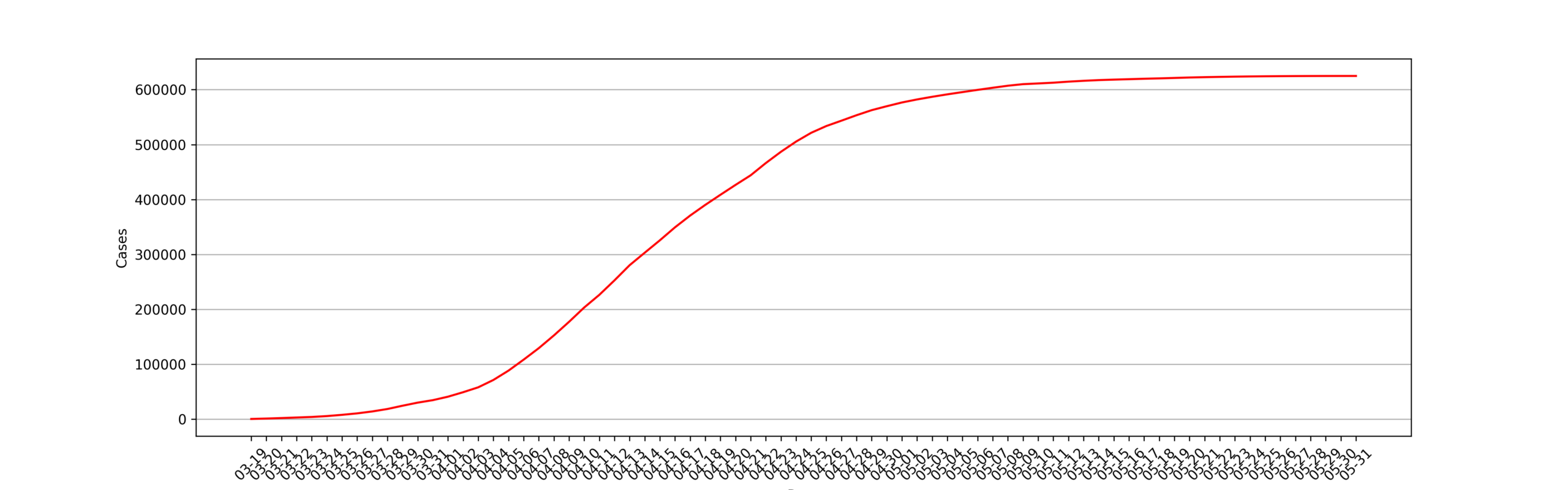
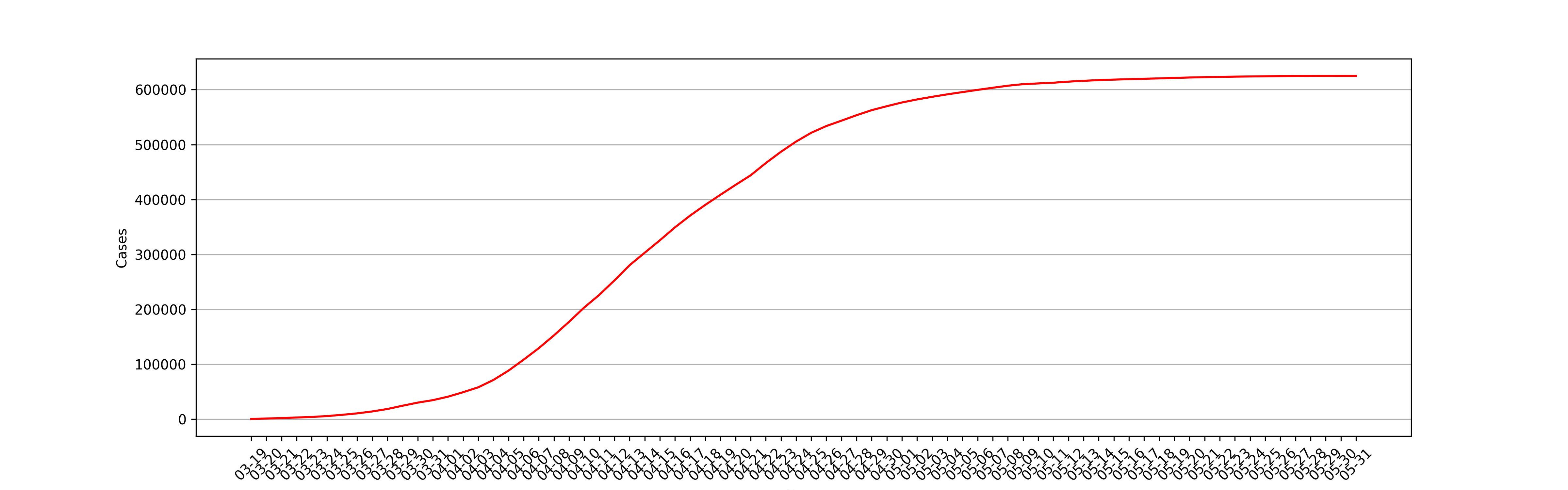
    Cases

    Cases

    Date Total Cases Total Deaths Case‑Fatality-Rate
    2022-05-31 624963 588 0.0941%
    2022-05-30 624949 588 0.0941%
    2022-05-29 624920 588 0.0941%
    2022-05-28 624855 588 0.0941%
    2022-05-27 624751 588 0.0941%
    2022-05-26 624599 588 0.0941%
    2022-05-25 624368 587 0.0940%
    2022-05-24 624061 586 0.0939%
    2022-05-23 623706 586 0.0940%
    2022-05-22 623265 585 0.0939%
    2022-05-21 622737 584 0.0938%
    2022-05-20 622144 581 0.0934%
    2022-05-19 621325 580 0.0933%
    2022-05-18 620538 580 0.0935%
    2022-05-17 619867 579 0.0934%
    2022-05-16 619068 576 0.0930%
    2022-05-15 618291 575 0.0930%
    2022-05-14 617395 571 0.0925%
    2022-05-13 616137 568 0.0922%
    2022-05-12 614596 567 0.0923%
    2022-05-11 612667 565 0.0922%
    2022-05-10 611324 560 0.0916%
    2022-05-09 610035 553 0.0907%
    2022-05-08 607177 547 0.0901%
    2022-05-07 603460 536 0.0888%
    2022-05-06 599620 528 0.0881%
    2022-05-05 595581 515 0.0865%
    2022-05-04 591493 503 0.0850%
    2022-05-03 587027 490 0.0835%
    2022-05-02 582196 474 0.0814%
    2022-05-01 576682 454 0.0787%
    2022-04-30 569878 422 0.0741%
    2022-04-29 562689 384 0.0682%
    2022-04-28 553493 337 0.0609%
    2022-04-27 543523 285 0.0524%
    2022-04-26 533759 238 0.0446%
    2022-04-25 521450 190 0.0364%
    2022-04-24 505438 138 0.0273%
    2022-04-23 486829 87 0.0179%
    2022-04-22 466312 48 0.0103%
    2022-04-21 444062 36 0.0081%
    2022-04-20 426576 25 0.0059%
    2022-04-19 408540 17 0.0042%
    2022-04-18 390172 10 0.0026%
    2022-04-17 370730 3 0.0008%
    2022-04-16 349335 0 0.0000%
    2022-04-15 325692 0 0.0000%
    2022-04-14 303101 0 0.0000%
    2022-04-13 280336 0 0.0000%
    2022-04-12 252731 0 0.0000%
    2022-04-11 226424 0 0.0000%
    2022-04-10 203355 0 0.0000%
    2022-04-09 177315 0 0.0000%
    2022-04-08 152563 0 0.0000%
    2022-04-07 129359 0 0.0000%
    2022-04-06 108460 0 0.0000%
    2022-04-05 88493 0 0.0000%
    2022-04-04 71456 0 0.0000%
    2022-04-03 58106 0 0.0000%
    2022-04-02 49171 0 0.0000%
    2022-04-01 41018 0 0.0000%
    2022-03-31 34709 0 0.0000%
    2022-03-30 30227 0 0.0000%
    2022-03-29 24590 0 0.0000%
    2022-03-28 18626 0 0.0000%
    2022-03-27 14170 0 0.0000%
    2022-03-26 10670 0 0.0000%
    2022-03-25 7994 0 0.0000%
    2022-03-24 5730 0 0.0000%
    2022-03-23 4121 0 0.0000%
    2022-03-22 3138 0 0.0000%
    2022-03-21 2157 0 0.0000%
    2022-03-20 1261 0 0.0000%
    2022-03-19 503 0 0.0000%

    District New Cases

    Date/District 浦东新区 黄浦区 静安区 徐汇区 长宁区 普陀区 虹口区 杨浦区 宝山区 闵行区 嘉定区 金山区 松江区 青浦区 奉贤区 崇明区
    2022-05-31 4 0 2 0 2 0 3 3 0 0 0 0 0 0 0 0
    2022-05-30 6 0 6 0 1 0 6 7 0 4 0 0 1 0 0 0
    2022-05-29 12 0 8 5 1 2 8 18 5 4 2 0 0 0 0 0
    2022-05-28 18 7 12 10 8 0 14 32 11 8 0 0 0 2 0 0
    2022-05-27 28 11 21 12 5 4 20 42 12 6 4 0 0 1 0 0
    2022-05-26 35 19 32 18 8 6 30 73 18 15 4 0 2 4 0 0
    2022-05-25 44 29 39 21 16 9 41 83 28 21 5 0 0 2 0 0
    2022-05-24 47 33 40 22 26 9 54 103 21 24 3 0 1 4 0 0
    2022-05-23 60 31 57 27 16 12 88 131 31 14 3 0 7 3 0 0
    2022-05-22 59 43 62 42 27 12 116 139 34 15 2 0 5 2 0 0
    2022-05-21 75 31 81 42 15 14 129 169 34 12 0 0 13 5 0 0
    2022-05-20 78 50 87 41 18 20 142 331 36 36 9 1 6 12 0 0
    2022-05-19 82 66 151 37 27 20 121 235 49 33 6 1 10 17 0 0
    2022-05-18 75 75 69 44 19 13 74 208 45 52 18 9 15 3 0 0
    2022-05-17 83 83 103 51 18 12 59 246 73 59 27 8 19 14 0 0
    2022-05-16 89 89 62 52 24 10 49 257 78 48 27 6 11 20 1 0
    2022-05-15 98 93 79 63 15 8 69 331 83 35 35 4 14 10 1 0
    2022-05-14 150 186 143 89 50 28 67 321 117 81 84 16 6 28 0 1
    2022-05-13 187 243 184 105 37 28 91 415 154 129 63 7 11 24 0 3
    2022-05-12 280 297 207 93 59 29 103 549 174 143 109 1 22 20 1 9
    2022-05-11 250 246 170 74 40 29 102 165 129 91 90 3 14 37 5 4
    2022-05-10 263 264 219 83 16 30 136 167 142 79 34 0 19 27 0 8
    2022-05-09 588 414 393 128 53 50 269 383 162 328 148 1 26 56 6 9
    2022-05-08 692 502 620 306 77 49 317 576 332 225 136 4 40 49 6 16
    2022-05-07 675 612 548 299 65 56 272 613 345 227 119 0 48 34 11 51
    2022-05-06 584 627 484 330 71 77 279 425 502 309 201 8 27 169 21 100
    2022-05-05 677 772 515 323 87 79 267 411 500 235 201 2 83 56 11 50
    2022-05-04 889 775 545 330 121 91 326 393 459 285 215 3 92 70 1 56
    2022-05-03 883 939 565 363 102 62 358 421 620 252 175 4 90 43 6 99
    2022-05-02 1162 974 616 417 151 79 366 388 636 287 279 7 68 94 10 135
    2022-05-01 1652 1112 702 442 243 95 669 467 983 386 268 14 96 115 13 76
    2022-04-30 1625 1156 996 488 181 114 591 342 1133 431 259 11 105 128 4 308
    2022-04-29 2028 1399 1267 602 377 141 1015 767 1197 516 268 19 134 156 26 269
    2022-04-28 3472 2656 1364 1580 647 235 1374 808 1243 422 488 28 402 269 6 38
    2022-04-27 2993 1452 1089 552 208 301 1091 526 1115 321 292 41 231 208 3 199
    2022-04-26 2745 1228 1394 904 419 365 1136 1106 1976 749 434 28 287 311 13 467
    2022-04-25 3912 2671 1016 1341 534 418 1270 1244 1786 717 543 22 641 379 12 474
    2022-04-24 6181 1755 1702 1396 749 477 655 1235 2506 1229 601 68 548 251 7 95
    2022-04-23 7626 1959 471 1722 727 478 819 1277 2886 877 751 44 773 424 16 208
    2022-04-22 7961 2843 786 1275 713 523 997 1356 2033 1305 500 26 2568 359 8 117
    2022-04-21 4655 1752 2064 1366 496 489 885 543 978 2563 776 30 493 385 34 120
    2022-04-20 4465 3097 1130 1447 726 555 832 2005 833 1686 649 17 676 280 32 65
    2022-04-19 5646 3084 1733 1608 618 528 753 766 957 1602 743 9 325 389 60 80
    2022-04-18 8831 3323 1010 572 680 371 1092 481 1030 1372 588 7 762 257 14 26
    2022-04-17 7740 1896 842 1553 739 1225 1166 887 1450 2402 978 24 905 369 20 52
    2022-04-16 10791 1565 1134 1532 706 1331 1027 860 1293 3060 685 21 410 305 51 49
    2022-04-15 10282 1384 433 1689 752 426 1497 1411 1323 2037 741 31 773 536 106 92
    2022-04-14 11656 2013 266 1342 998 264 930 817 417 2378 803 28 761 304 35 60
    2022-04-13 15027 1408 220 1492 957 475 1488 1185 651 2939 721 34 657 319 83 63
    2022-04-12 11049 1804 1056 1108 1133 1170 931 1159 295 4245 986 39 712 524 33 86
    2022-04-11 8306 2223 552 1771 393 1878 1375 1420 1024 3007 208 38 691 331 68 57
    2022-04-10 6732 1761 603 3203 387 1001 1238 1877 1839 3189 1405 57 1825 877 38 55
    2022-04-09 11130 548 602 1150 757 653 349 1080 2261 4624 369 68 500 557 124 171
    2022-04-08 7286 2607 665 1629 614 1094 378 701 2821 2854 1505 90 771 342 97 170
    2022-04-07 9050 1380 381 2076 852 957 594 601 414 2257 933 129 751 493 92 262
    2022-04-06 8457 1044 545 1107 350 1033 668 630 660 2409 1408 79 781 470 278 63
    2022-04-05 8145 658 302 920 84 483 410 623 554 2937 481 77 796 384 144 79
    2022-04-04 7071 970 50 1229 33 254 608 220 265 1381 237 52 559 314 64 47
    2022-04-03 3654 824 338 499 104 321 188 374 467 940 415 103 263 232 119 165
    2022-04-02 2038 659 324 1042 100 388 342 274 485 829 617 60 567 231 157 113
    2022-04-01 2584 2584 260 260 189 189 639 639 37 37 245 245 61 61 134 134
    2022-03-31 2407 121 164 226 256 15 128 174 17 392 54 42 184 95 183 44
    2022-03-30 2207 361 102 404 128 146 84 100 504 780 158 33 246 77 130 193
    2022-03-29 2183 110 175 1100 30 113 73 99 363 988 255 26 229 87 96 55
    2022-03-28 2506 283 104 91 115 81 8 47 311 370 209 19 94 57 115 67
    2022-03-27 1429 56 70 277 45 70 27 35 94 619 251 13 190 43 45 236
    2022-03-26 323 160 108 331 29 69 50 23 153 972 242 4 79 22 84 27
    2022-03-25 1914 23 2 3 4 9 4 11 4 206 19 1 15 13 0 41
    2022-03-24 193 102 70 167 59 38 29 21 87 490 130 12 92 13 24 82
    2022-03-23 218 20 48 106 11 34 26 11 69 256 69 5 34 10 12 54
    2022-03-22 237 59 28 87 19 21 13 3 16 305 111 4 31 20 8 19
    2022-03-21 169 49 44 130 26 31 23 10 67 122 103 16 39 5 22 40
    2022-03-20 220 42 32 46 13 18 12 8 13 265 40 11 9 4 13 0
    2022-03-19 135 36 15 61 12 25 0 14 17 53 81 3 16 5 6 23

    District Total Cases

    Date/District 浦东新区 黄浦区 静安区 徐汇区 长宁区 普陀区 虹口区 杨浦区 宝山区 闵行区 嘉定区 金山区 松江区 青浦区 奉贤区 崇明区
    2022-05-31 229688 61684 32497 46371 18273 20041 30943 35501 43510 66625 23773 1666 22657 11930 2897 5716
    2022-05-30 229684 61684 32495 46371 18271 20041 30940 35498 43510 66625 23773 1666 22657 11930 2897 5716
    2022-05-29 229678 61684 32489 46371 18270 20041 30934 35491 43510 66621 23773 1666 22656 11930 2897 5716
    2022-05-28 229666 61684 32481 46366 18269 20039 30926 35473 43505 66617 23771 1666 22656 11930 2897 5716
    2022-05-27 229648 61677 32469 46356 18261 20039 30912 35441 43494 66609 23771 1666 22656 11928 2897 5716
    2022-05-26 229620 61666 32448 46344 18256 20035 30892 35399 43482 66603 23767 1666 22656 11927 2897 5716
    2022-05-25 229585 61647 32416 46326 18248 20029 30862 35326 43464 66588 23763 1666 22654 11923 2897 5716
    2022-05-24 229541 61618 32377 46305 18232 20020 30821 35243 43436 66567 23758 1666 22654 11921 2897 5716
    2022-05-23 229494 61585 32337 46283 18206 20011 30767 35140 43415 66543 23755 1666 22653 11917 2897 5716
    2022-05-22 229434 61554 32280 46256 18190 19999 30679 35009 43384 66529 23752 1666 22646 11914 2897 5716
    2022-05-21 229375 61511 32218 46214 18163 19987 30563 34870 43350 66514 23750 1666 22641 11912 2897 5716
    2022-05-20 229300 61480 32137 46172 18148 19973 30434 34701 43316 66502 23750 1666 22628 11907 2897 5716
    2022-05-19 229222 61430 32050 46131 18130 19953 30292 34370 43280 66466 23741 1665 22622 11895 2897 5716
    2022-05-18 229140 61364 31899 46094 18103 19933 30171 34135 43231 66433 23735 1664 22612 11878 2897 5716
    2022-05-17 229065 61289 31830 46050 18084 19920 30097 33927 43186 66381 23717 1655 22597 11875 2897 5716
    2022-05-16 228982 61206 31727 45999 18066 19908 30038 33681 43113 66322 23690 1647 22578 11861 2897 5716
    2022-05-15 228893 61117 31665 45947 18042 19898 29989 33424 43035 66274 23663 1641 22567 11841 2896 5716
    2022-05-14 228795 61024 31586 45884 18027 19890 29920 33093 42952 66239 23628 1637 22553 11831 2895 5716
    2022-05-13 228645 60838 31443 45795 17977 19862 29853 32772 42835 66158 23544 1621 22547 11803 2895 5715
    2022-05-12 228458 60595 31259 45690 17940 19834 29762 32357 42681 66029 23481 1614 22536 11779 2895 5712
    2022-05-11 228178 60298 31052 45597 17881 19805 29659 31808 42507 65886 23372 1613 22514 11759 2894 5703
    2022-05-10 227928 60052 30882 45523 17841 19776 29557 31643 42378 65795 23282 1610 22500 11722 2889 5699
    2022-05-09 227665 59788 30663 45440 17825 19746 29421 31476 42236 65716 23248 1610 22481 11695 2889 5691
    2022-05-08 227077 59374 30270 45312 17772 19696 29152 31093 42074 65388 23100 1609 22455 11639 2883 5682
    2022-05-07 226385 58872 29650 45006 17695 19647 28835 30517 41742 65163 22964 1605 22415 11590 2877 5666
    2022-05-06 225710 58260 29102 44707 17630 19591 28563 29904 41397 64936 22845 1605 22367 11556 2866 5615
    2022-05-05 225126 57633 28618 44377 17559 19514 28284 29479 40895 64627 22644 1597 22340 11387 2845 5515
    2022-05-04 224449 56861 28103 44054 17472 19435 28017 29068 40395 64392 22443 1595 22257 11331 2834 5465
    2022-05-03 223560 56086 27558 43724 17351 19344 27691 28675 39936 64107 22228 1592 22165 11261 2833 5409
    2022-05-02 222677 55147 26993 43361 17249 19282 27333 28254 39316 63855 22053 1588 22075 11218 2827 5310
    2022-05-01 221515 54173 26377 42944 17098 19203 26967 27866 38680 63568 21774 1581 22007 11124 2817 5175
    2022-04-30 219863 53061 25675 42502 16855 19108 26298 27399 37697 63182 21506 1567 21911 11009 2804 5099
    2022-04-29 218238 51905 24679 42014 16674 18994 25707 27057 36564 62751 21247 1556 21806 10881 2800 4791
    2022-04-28 216210 50506 23412 41412 16297 18853 24692 26290 35367 62235 20979 1537 21672 10725 2774 4522
    2022-04-27 212738 47850 22048 39832 15650 18618 23318 25482 34124 61813 20491 1509 21270 10456 2768 4484
    2022-04-26 209745 46398 20959 39280 15442 18317 22227 24956 33009 61492 20199 1468 21039 10248 2765 4285
    2022-04-25 207000 45170 19565 38376 15023 17952 21091 23850 31033 60743 19765 1440 20752 9937 2752 3818
    2022-04-24 203088 42499 18549 37035 14489 17534 19821 22606 29247 60026 19222 1418 20111 9558 2740 3344
    2022-04-23 196907 40744 16847 35639 13740 17057 19166 21371 26741 58797 18621 1350 19563 9307 2733 3249
    2022-04-22 189281 38785 16376 33917 13013 16579 18347 20094 23855 57920 17870 1306 18790 8883 2717 3041
    2022-04-21 181320 35942 15590 32642 12300 16056 17350 18738 21822 56615 17370 1280 16222 8524 2709 2924
    2022-04-20 176665 34190 13526 31276 11804 15567 16465 18195 20844 54052 16594 1250 15729 8139 2675 2804
    2022-04-19 172200 31093 12396 29829 11078 15012 15633 16190 20011 52366 15945 1233 15053 7859 2643 2739
    2022-04-18 166554 28009 10663 28221 10460 14484 14880 15424 19054 50764 15202 1224 14728 7470 2583 2659
    2022-04-17 157723 24686 9653 27649 9780 14113 13788 14943 18024 49392 14614 1217 13966 7213 2569 2633
    2022-04-16 149983 22790 8811 26096 9041 12888 12622 14056 16574 46990 13636 1193 13061 6844 2549 2581
    2022-04-15 139192 21225 7677 24564 8335 11557 11595 13196 15281 43930 12951 1172 12651 6539 2498 2532
    2022-04-14 128910 19841 7244 22875 7583 11131 10098 11785 13958 41893 12210 1141 11878 6003 2392 2440
    2022-04-13 117254 17828 6978 21533 6585 10867 9168 10968 13541 39515 11407 1113 11117 5699 2357 2380
    2022-04-12 102227 16420 6758 20041 5628 10392 7680 9783 12890 36576 10686 1079 10460 5380 2274 2317
    2022-04-11 91178 14616 5702 18933 4495 9222 6749 8624 12595 32331 9700 1040 9748 4856 2241 2231
    2022-04-10 82872 12393 5150 17162 4102 7344 5374 7204 11571 29324 9492 1002 9057 4525 2173 2174
    2022-04-09 76140 10632 4547 13959 3715 6343 4136 5327 9732 26135 8087 945 7232 3648 2135 2119
    2022-04-08 65010 10084 3945 12809 2958 5690 3787 4247 7471 21511 7718 877 6732 3091 2011 1948
    2022-04-07 57724 7477 3280 11180 2344 4596 3409 3546 4650 18657 6213 787 5961 2749 1914 1778
    2022-04-06 48674 6097 2899 9104 1492 3639 2815 2945 4236 16400 5280 658 5210 2256 1822 1516
    2022-04-05 40217 5053 2354 7997 1142 2606 2147 2315 3576 13991 3872 579 4429 1786 1544 1453
    2022-04-04 32072 4395 2052 7077 1058 2123 1737 1692 3022 11054 3391 502 3633 1402 1400 1374
    2022-04-03 25001 3425 2002 5848 1025 1869 1129 1472 2757 9673 3154 450 3074 1088 1336 1327
    2022-04-02 21347 2601 1664 5349 921 1548 941 1098 2290 8733 2739 347 2811 856 1217 1162
    2022-04-01 16725 19309 1682 1942 1151 1340 3668 4307 784 821 915 1160 538 599 690 824
    2022-03-31 14141 1422 962 3029 747 670 477 556 1715 5818 1722 189 1258 451 738 881
    2022-03-30 11734 1301 798 2803 491 655 349 382 1698 5426 1668 147 1074 356 555 837
    2022-03-29 9527 940 696 2399 363 509 265 282 1194 4646 1510 114 828 279 425 644
    2022-03-28 7344 830 521 1299 333 396 192 183 831 3658 1255 88 599 192 329 589
    2022-03-27 4838 547 417 1208 218 315 184 136 520 3288 1046 69 505 135 214 522
    2022-03-26 3409 491 347 931 173 245 157 101 426 2669 795 56 315 92 169 286
    2022-03-25 3086 331 239 600 144 176 107 78 273 1697 553 52 236 70 85 259
    2022-03-24 1172 308 237 597 140 167 103 67 269 1491 534 51 221 57 85 218
    2022-03-23 979 206 167 430 81 129 74 46 182 1001 404 39 129 44 61 136
    2022-03-22 761 186 119 324 70 95 48 35 113 745 335 34 95 34 49 82
    2022-03-21 524 127 91 237 51 74 35 32 97 440 224 30 64 14 41 63
    2022-03-20 355 78 47 107 25 43 12 22 30 318 121 14 25 9 19 23
    2022-03-19 135 36 15 61 12 25 0 14 17 53 81 3 16 5 6 23

    District Covid-19 Places

    Date/District 浦东新区 黄浦区 静安区 徐汇区 长宁区 普陀区 虹口区 杨浦区 宝山区 闵行区 嘉定区 金山区 松江区 青浦区 奉贤区 崇明区
    2022-05-31 4 1 1 0 2 0 2 0 0 0 0 0 0 0 0 1
    2022-05-30 6 0 5 0 1 0 3 2 0 2 0 0 1 0 0 1
    2022-05-29 7 0 4 2 1 1 7 3 4 1 1 0 2 0 0 0
    2022-05-28 9 4 9 7 1 0 10 6 7 1 0 0 0 2 0 0
    2022-05-27 20 6 14 4 4 2 15 5 9 0 2 0 1 1 0 0
    2022-05-26 17 17 13 8 6 3 21 11 11 3 1 0 1 4 0 0
    2022-05-25 21 15 22 7 4 7 31 11 17 2 3 0 0 2 0 0
    2022-05-24 23 18 23 8 8 4 31 17 15 3 2 0 1 1 0 0
    2022-05-23 22 21 19 9 4 6 50 20 20 2 1 0 4 3 0 0
    2022-05-22 32 29 28 11 10 6 66 14 21 3 0 0 3 2 0 0
    2022-05-21 31 23 33 9 3 9 76 28 23 6 0 0 5 4 0 0
    2022-05-20 39 32 47 17 6 12 80 26 21 5 1 1 3 7 0 0
    2022-05-19 44 43 68 7 8 14 66 35 34 6 0 0 7 7 0 0
    2022-05-18 33 40 26 16 11 8 43 45 33 16 2 0 6 2 0 0
    2022-05-17 36 56 29 7 7 9 36 43 42 16 2 0 7 9 0 0
    2022-05-16 31 58 29 11 8 7 33 82 43 4 1 2 6 8 0 0
    2022-05-15 47 57 13 23 5 5 41 104 51 4 1 2 7 8 1 0
    2022-05-14 66 109 67 28 22 21 52 100 59 19 5 2 3 8 0 1
    2022-05-13 83 141 76 32 13 17 59 102 76 25 6 0 5 10 0 3
    2022-05-12 116 158 80 25 31 15 56 117 93 26 10 0 11 9 0 3
    2022-05-11 98 134 87 23 10 16 52 66 72 5 10 0 5 13 1 3
    2022-05-10 92 141 108 24 7 19 63 28 88 6 5 0 13 10 0 3
    2022-05-09 236 208 161 26 31 31 126 92 65 43 27 0 20 23 3 4
    2022-05-08 263 254 231 71 30 27 148 135 169 38 17 0 22 25 0 7
    2022-05-07 208 323 226 63 30 28 146 156 169 33 18 0 31 13 2 5
    2022-05-06 269 294 231 74 32 34 120 115 234 45 32 1 16 24 1 7
    2022-05-05 266 377 206 78 40 47 132 123 224 50 40 0 43 20 2 8
    2022-05-04 337 364 225 90 48 36 113 127 209 56 53 0 54 19 0 8
    2022-05-03 337 411 247 77 49 23 182 158 232 67 20 0 39 19 3 11
    2022-05-02 409 427 236 89 67 38 173 127 262 69 48 0 28 22 3 8
    2022-05-01 513 485 234 113 60 39 250 192 326 88 44 0 42 37 0 9
    2022-04-30 440 489 313 116 68 46 209 141 388 88 50 0 49 35 0 4
    2022-04-29 658 508 407 180 95 41 285 247 386 125 68 2 58 29 2 7
    2022-04-28 689 575 361 298 130 79 341 213 277 100 107 1 68 50 0 6
    2022-04-27 741 609 403 133 76 99 361 220 312 98 73 0 93 50 2 4
    2022-04-26 740 522 376 269 137 106 355 339 515 197 113 1 91 63 5 2
    2022-04-25 926 895 305 310 135 119 428 342 388 199 162 0 144 99 3 0
    2022-04-24 1320 718 542 375 179 138 240 378 586 327 184 4 88 58 4 0
    2022-04-23 1472 748 127 308 206 119 297 391 743 225 169 3 168 90 5 0
    2022-04-22 1522 930 238 321 185 112 390 362 556 328 156 1 119 85 0 0
    2022-04-21 1050 658 516 359 157 131 343 200 308 511 174 1 149 94 0 0
    2022-04-20 982 948 368 380 206 128 347 482 325 411 179 1 196 60 0 0
    2022-04-19 1144 953 509 360 196 152 284 275 295 391 169 2 92 93 0 0
    2022-04-18 1397 915 290 171 192 130 433 179 346 328 185 0 201 52 1 0
    2022-04-17 1550 681 292 349 174 206 398 300 413 506 204 0 162 85 5 0
    2022-04-16 1778 570 320 374 178 280 365 307 333 562 177 1 52 62 4 4
    2022-04-15 1746 601 106 357 283 64 377 402 234 433 211 2 207 112 11 7
    2022-04-14 1704 700 96 360 298 79 330 302 195 530 219 3 189 58 5 5
    2022-04-13 1863 516 87 365 315 127 522 381 231 623 192 4 221 77 10 6
    2022-04-12 1580 637 395 320 315 271 335 376 141 740 253 7 243 152 12 6
    2022-04-11 1588 668 210 353 159 343 454 453 359 618 65 8 214 91 29 11
    2022-04-10 1421 647 214 585 164 247 380 573 580 505 332 20 381 224 21 6
    2022-04-09 1969 289 232 323 277 220 171 403 786 366 115 12 181 191 28 2
    2022-04-08 1227 825 249 393 235 277 188 281 849 320 381 12 270 112 32 9
    2022-04-07 1706 568 166 325 325 269 132 235 224 287 309 25 284 165 42 10
    2022-04-06 1509 481 227 339 197 289 271 302 323 321 465 33 236 191 75 16
    2022-04-05 1274 339 155 300 55 179 163 276 252 324 135 32 278 179 64 13
    2022-04-04 1443 467 18 403 30 104 261 134 148 162 98 28 209 138 39 9
    2022-04-03 1010 369 168 174 51 135 123 216 207 196 148 53 119 114 72 19
    2022-04-02 716 275 165 317 70 188 197 154 222 197 213 33 159 101 88 23
    2022-04-01 882 882 139 139 105 105 230 230 27 27 139 139 47 47 99 99
    2022-03-31 858 82 64 87 120 9 96 115 14 116 30 29 92 35 114 6
    2022-03-30 829 196 52 123 64 70 57 55 203 194 62 21 102 46 75 16
    2022-03-29 747 84 90 264 23 69 58 76 149 194 102 8 77 26 57 21
    2022-03-28 1034 169 60 46 55 53 6 30 108 109 81 5 68 31 73 5
    2022-03-27 616 42 38 93 22 45 16 26 55 154 91 11 99 26 27 6
    2022-03-26 107 77 40 93 21 40 34 19 93 231 101 1 47 11 49 6
    2022-03-25 678 16 2 2 4 6 3 7 4 74 10 1 11 7 0 5
    2022-03-24 33 58 38 79 31 20 20 14 51 147 62 6 38 9 16 14
    2022-03-23 140 13 29 44 9 23 14 11 44 81 31 2 25 7 12 5
    2022-03-22 152 37 20 40 14 17 10 3 12 107 30 2 15 11 6 4
    2022-03-21 106 34 22 54 20 22 11 9 44 54 57 11 22 5 13 4
    2022-03-20 139 23 24 19 11 17 8 7 9 106 32 9 8 4 8 2
    2022-03-19 86 24 13 39 9 17 5 8 13 30 34 3 7 3 5 1

    Data Source

    Visit original content creator repository
  • fortify

    Teddy
    Fortify

    Fortify is a puzzle game where your objective is to protect teddy 🧸

    This game was made during the Global Game Jam 2019 (GGJ). The theme of the jam was:

    What home means to you

    This project was bootstrapped with phaser-template and hosted on remarkablegames. To learn more, read the following blog post.

    Play this game on:

    Prerequisites

    Install

    Clone repository:

    git clone https://github.com/remarkablegames/fortify.git

    Install dependencies:

    npm install

    Available Scripts

    In the project directory, you can run:

    npm start

    Runs the game in the development mode.

    Open http://localhost:3000 to view it in the browser.

    The page will reload if you make edits.

    You will also see any lint errors in the console.

    npm run build

    Builds the game for production to the build folder.

    It correctly bundles in production mode and optimizes the build for the best performance.

    The build is minified and the filenames include the hashes.

    Your game is ready to be deployed!

    npm run release

    Bumps the package.json using standard-version.

    npm run deploy

    Deploys the game to GitHub Pages by force pushing the build folder to the remote repository’s gh-pages branch.

    Uploading the Game

    If you’re uploading the game to a site, make sure to do the following:

    1. Open package.json and change the "homepage" value to ".". This ensures the links are relative. Optional: update the game config url in src/index.js.

    2. Optional: remove GitHub Corners from public/index.html and src/index.css.

    3. Build the game, remove any unnecessary files, and compress the folder into a zip archive:

      npm run clean
      npm run build
      rm build/service-worker.js
      zip -r fortify.zip build
    4. Don’t forget to clean up the project directory after the upload succeeds:

      rm fortify.zip

    Contributors

    Ben Budnevich   Dan Phillips   remarkablemark

    License

    MIT

    Visit original content creator repository
  • reclutch

    Reclutch

    Build Status

    A strong foundation for building predictable and straight-forward Rust UI toolkits. Reclutch is:

    • Bare: Very little UI code is included. In practice it’s a utility library which makes very little assumptions about the toolkit or UI.
    • Platform-agnostic: Although a default display object is provided, the type of display object is generic, meaning you can build for platforms other than desktop. For example you can create web applications simply by using DOM nodes as display objects while still being efficient, given the retained-mode design.
    • Reusable: Provided structures such as unbound queue handlers allow for the reuse of common logical components across widgets.

    Overview

    Reclutch implements the well-known retained-mode widget ownership design within safe Rust, following along the footsteps of popular desktop frameworks. To implement this behavior, three core ideas are implemented:

    • A widget ownership model with no middleman, allowing widgets to mutate children at any time, but also collect children as a whole to make traversing the widget tree a trivial task.
    • A robust event queue system with support for futures, crossbeam and winit event loop integration, plus a multitude of queue utilities and queue variations for support in any environment.
    • An event queue abstraction to facilitate just-in-time event coordination between widgets, filling any pitfalls that may arise when using event queues. Beyond this, it also moves the code to handle queues to the constructor, presenting an opportunity to modularize and reuse logic across widgets.

    Note for MacOS

    There appears to be a bug with shared OpenGL textures on MacOS. As a result, the opengl example won’t work correctly. For applications that require rendering from multiple contexts into a single texture, consider using Vulkan or similar.

    Also see:

    Example

    All rendering details have been excluded for simplicity.

    #[derive(WidgetChildren)]
    struct Button {
        pub button_press: RcEventQueue<()>,
        graph: VerbGraph<Button, ()>,
    }
    
    impl Button {
        pub fn new(global: &mut RcEventQueue<WindowEvent>) -> Self {
            Button {
                button_press: RcEventQueue::new(),
                global_listener: VerbGraph::new().add(
                    "global",
                    QueueHandler::new(global).on("click", |button, _aux, _event: WindowEvent| {
                        button.button_press.emit_owned(());
                    }),
                ),
            }
        }
    }
    
    impl Widget for Button {
        type UpdateAux = ();
        type GraphicalAux = ();
        type DisplayObject = DisplayCommand;
    
        fn bounds(&self) -> Rect { /* --snip-- */ }
    
        fn update(&mut self, aux: &mut ()) {
            // Note: this helper function requires that `HasVerbGraph` be implemented on `Self`.
            reclutch_verbgraph::update_all(self, aux);
            // The equivalent version which doesn't require `HasVerbGraph` is;
            let mut graph = self.graph.take().unwrap();
            graph.update_all(self, aux);
            self.graph = Some(graph);
        }
    
        fn draw(&mut self, display: &mut dyn GraphicsDisplay, _aux: &mut ()) { /* --snip-- */ }
    }

    The classic counter example can be found in examples/overview.


    Children

    Children are stored manually by the implementing widget type.

    #[derive(WidgetChildren)]
    struct ExampleWidget {
        #[widget_child]
        child: AnotherWidget,
        #[vec_widget_child]
        children: Vec<AnotherWidget>,
    }

    Which expands to exactly…

    impl reclutch::widget::WidgetChildren for ExampleWidget {
        fn children(
            &self,
        ) -> Vec<
            &dyn reclutch::widget::WidgetChildren<
                UpdateAux = Self::UpdateAux,
                GraphicalAux = Self::GraphicalAux,
                DisplayObject = Self::DisplayObject,
            >,
        > {
            let mut children = Vec::with_capacity(1 + self.children.len());
            children.push(&self.child as _);
            for child in &self.children {
                children.push(child as _);
            }
            children
        }
    
        fn children_mut(
            &mut self,
        ) -> Vec<
            &mut dyn reclutch::widget::WidgetChildren<
                UpdateAux = Self::UpdateAux,
                GraphicalAux = Self::GraphicalAux,
                DisplayObject = Self::DisplayObject,
            >,
        > {
            let mut children = Vec::with_capacity(1 + self.children.len());
            children.push(&mut self.child as _);
            for child in &mut self.children {
                children.push(child as _);
            }
            children
        }
    }

    (Note: you can switch out the reclutch::widget::WidgetChildrens above with your own trait using #[widget_children_trait(...)])

    Then all the other functions (draw, update, maybe even bounds for parent clipping) are propagated manually (or your API can have a function which automatically and recursively invokes for both parent and child);

    fn draw(&mut self, display: &mut dyn GraphicsDisplay) {
        // do our own rendering here...
    
        // ...then propagate to children
        for child in self.children_mut() {
            child.draw(display);
        }
    }

    Note: WidgetChildren requires that Widget is implemented.

    The derive functionality is a feature, enabled by default.

    Rendering

    Rendering is done through “command groups”. It’s designed in a way that both a retained-mode renderer (e.g. WebRender) and an immediate-mode renderer (Direct2D, Skia, Cairo) can be implemented. The API also supports Z-Order.

    struct VisualWidget {
        command_group: CommandGroup,
    }
    
    impl Widget for VisualWidget {
        // --snip--
    
        fn update(&mut self, _aux: &mut ()) {
            if self.changed {
                // This simply sets an internal boolean to "true", so don't be afraid to call it multiple times during updating.
                self.command_group.repaint();
            }
        }
    
        // Draws a nice red rectangle.
        fn draw(&mut self, display: &mut dyn GraphicsDisplay, _aux: &mut ()) {
            let mut builder = DisplayListBuilder::new();
            builder.push_rectangle(
                Rect::new(Point::new(10.0, 10.0), Size::new(30.0, 50.0)),
                GraphicsDisplayPaint::Fill(Color::new(1.0, 0.0, 0.0, 1.0).into()),
                None);
    
            // Only pushes/modifies the command group if a repaint is needed.
            self.command_group.push(display, &builder.build(), Default::default(), None, true);
    
            draw_children();
        }
    
        // --snip--
    }

    Updating

    The update method on widgets is an opportunity for widgets to update layout, animations, etc. and more importantly handle events that have been emitted since the last update.

    Widgets have an associated type; UpdateAux which allows for a global object to be passed around during updating. This is useful for things like updating a layout.

    Here’s a simple example;

    type UpdateAux = Globals;
    
    fn update(&mut self, aux: &mut Globals) {
        if aux.layout.node_is_dirty(self.layout_node) {
            self.bounds = aux.layout.get_node(self.layout_node);
            self.command_group.repaint();
        }
    
        self.update_animations(aux.delta_time());
    
        // propagation is done manually
        for child in self.children_mut() {
            child.update(aux);
        }
    
        // If your UI doesn't update constantly, then you must check child events *after* propagation,
        // but if it does update constantly, then it's more of a micro-optimization, since any missed events
        // will come back around next update.
        //
        // This kind of consideration can be avoided by using the more "modern" updating API; `verbgraph`,
        // which is discussed in the "Updating correctly" section.
        for press_event in self.button_press_listener.peek() {
            self.on_button_press(press_event);
        }
    }

    Updating correctly

    The above code is fine, but for more a complex UI then there is the possibility of events being processed out-of-order. To fix this, Reclutch has the verbgraph module; a facility to jump between widgets and into their specific queue handlers. In essence, it breaks the linear execution of update procedures so that dependent events can be handled even if the primary update function has already be executed.

    This is best shown through example;

    fn new() -> Self {
        let graph = verbgraph! {
            Self as obj,
            Aux as aux,
    
            // the string "count_up" is the tag used to identify procedures.
            // they can also overlap.
            "count_up" => event in &count_up.event => {
                click => {
                    // here we mutate a variable that `obj.template_label` implicitly/indirectly depends on.
                    obj.count += 1;
                    // Here template_label is assumed to be a label whose text uses a template engine
                    // that needs to be explicitly rendered.
                    obj.template_label.values[0] = obj.count.to_string();
                    // If we don't call this then `obj.dynamic_label` doesn't
                    // get a chance to respond to our changes in this update pass.
                    // This doesn't invoke the entire update cycle for `template_label`, only the specific part we care about; `"update_template"`.
                    reclutch_verbgraph::require_update(&mut obj.template_label, aux, "update_template");
                    // "update_template" refers to the tag.
                }
            }
        };
        // ...
    }
    
    fn update(&mut self, aux: &mut Aux) {
        for child in self.children_mut() {
            child.update(aux);
        }
    
        reclutch_verbgraph::update_all(self, aux);
    }

    In the verbgraph module is also the Event trait, which is required to support the syntax seen in verbgraph!.

    #[derive(Event, Clone)]
    enum AnEvent {
        #[event_key(pop)]
        Pop,
        #[event_key(squeeze)]
        Squeeze(f32),
        #[event_key(smash)]
        Smash {
            force: f64,
            hulk: bool,
        },
    }

    Generates exactly;

    impl reclutch::verbgraph::Event for AnEvent {
        fn get_key(&self) -> &'static str {
            match self {
                AnEvent::Pop => "pop",
                AnEvent::Squeeze(..) => "squeeze",
                AnEvent::Smash{..} => "smash",
            }
        }
    }
    
    impl AnEvent {
        pub fn unwrap_as_pop(self) -> Option<()> {
            if let AnEvent::Pop = self {
                Some(())
            } else {
                None
            }
        }
    
        pub fn unwrap_as_squeeze(self) -> Option<(f32)> {
            if let AnEvent::Squeeze(x0) = self {
                Some((x0))
            } else {
                None
            }
        }
    
        pub fn unwrap_as_smash(self) -> Option<(f64, bool)> {
            if let AnEvent::Smash{force, hulk} = self {
                Some((force, hulk))
            } else {
                None
            }
        }
    }

    get_key is used to find the correct closure to execute given an event and unwrap_as_ is used to extract the inner information from within the given closure (because once get_key is matched then we can be certain it is of a certain variant).

    License

    Reclutch is licensed under either

    at your choosing.

    This license also applies to all “sub-projects” (event, derive and verbgraph).

    Visit original content creator repository